Best Product Feedback Tools in 2026: Collect, Analyze & Act on User Input
Compare the best product feedback tools across 5 categories — in-app widgets, review platforms, survey tools, feature voting boards, and support channels. Includes tool comparisons for Canny, UserVoice, Hotjar, Typeform, Sentimyne, and Productboard with pricing, feature breakdowns, and guidance on building a complete feedback stack.
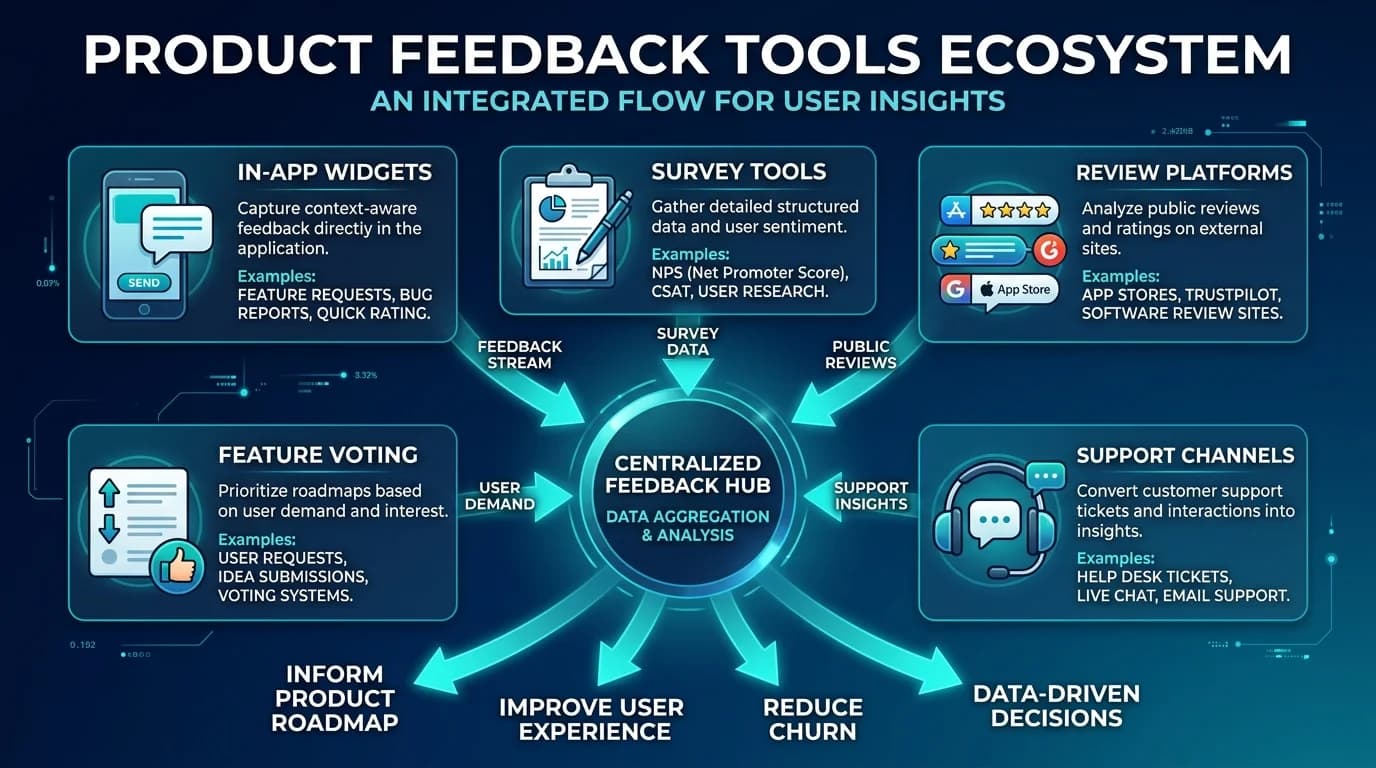
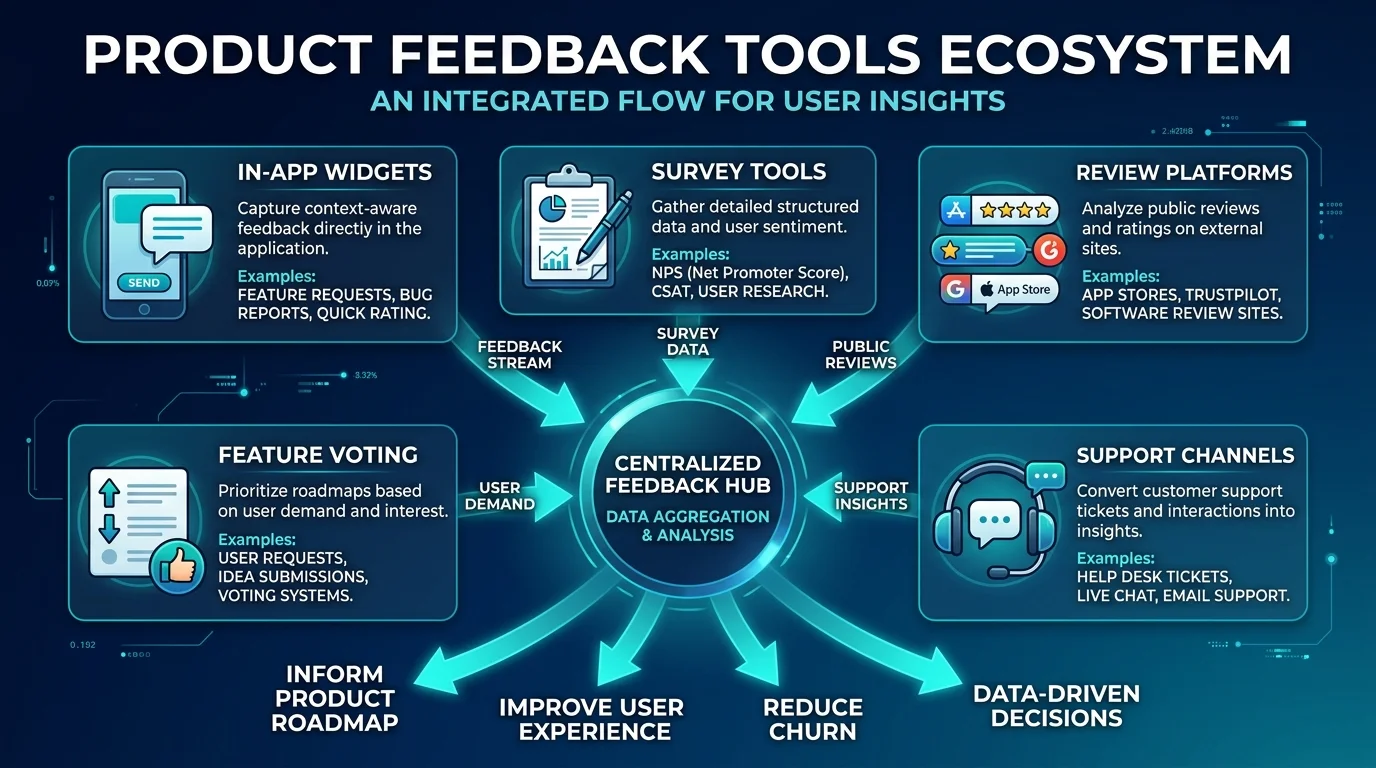
Product feedback is the gap between what you think your customers want and what they actually need. Close that gap and you build products people love. Leave it open and you build features nobody uses, fix problems nobody has, and wonder why churn keeps climbing.
The challenge is not getting feedback — customers leave it everywhere. The challenge is collecting it systematically, analyzing it at scale, and connecting it to product decisions. That requires the right tools, configured correctly, and integrated into your product development workflow.
This guide compares the best product feedback tools across five categories, with specific recommendations for different team sizes, budgets, and product types. No tool covers everything, so we also cover how to build a feedback stack that captures the full spectrum of user input.
Why Most Product Teams Get Feedback Wrong
Before comparing tools, it is worth understanding why product teams struggle with feedback even when they have tools in place.
Problem 1: They only listen to the loudest voices. The customers who email you, tweet at you, or submit support tickets are a vocal minority. They represent perhaps 5-10% of your user base. The silent majority — customers who are mildly dissatisfied but not upset enough to complain, or satisfied but not delighted enough to praise — are invisible unless you actively seek their input.
Problem 2: They confuse feature requests with feedback. When a customer says "I wish you had dark mode," that is a feature request. When a customer says "I cannot use your app at night because the screen is too bright," that is feedback. Feature requests describe a solution the customer imagined. Feedback describes a problem the customer experiences. Product teams should collect both but treat them very differently.
Problem 3: They collect but do not analyze. A spreadsheet with 500 feature requests is not a feedback program. Without categorization, prioritization, and trend analysis, raw feedback creates more confusion than clarity. The product manager who reads every piece of feedback individually will drown. The one who clusters feedback into themes and tracks those themes over time will make better decisions.
"Feedback without analysis is noise. Analysis without action is waste. A product feedback program must close the loop — from collection to analysis to decision to communication back to the customer."
The 5 Categories of Product Feedback Tools
Category 1: In-App Feedback Widgets
In-app widgets capture feedback at the moment of experience — while the user is actively engaged with your product. This contextual feedback is higher quality than feedback collected after the fact because the user can point to exactly what they are reacting to.
Typical features: Micro-surveys, feedback buttons, screenshot annotations, session recordings, heatmaps.
Best for: SaaS products, mobile apps, web applications.
Limitations: Only captures feedback from active users. Misses churned users, prospects evaluating your product, and users who switched to competitors.
Category 2: Review Analysis Platforms
Review platforms capture unsolicited opinions from customers across public platforms — Amazon, Trustpilot, G2, Google, App Store, and others. This feedback is uniquely valuable because it is unprompted, publicly visible (influencing other buyers), and often includes competitive comparisons.
Typical features: Multi-platform review aggregation, sentiment analysis, theme clustering, competitive benchmarking, SWOT analysis.
Best for: E-commerce products, SaaS with G2/Capterra presence, consumer products, marketplace sellers.
Limitations: Feedback skews toward extremes (very happy or very unhappy). Not all product categories have robust review ecosystems.
For a deeper look at how review analysis tools compare, see our best AI review analysis tools guide.
Category 3: Survey and Form Tools
Survey tools capture structured feedback through forms and questionnaires you design. They give you control over what questions are asked and provide quantitative data that is easy to aggregate and trend over time.
Typical features: Form builders, logic branching, response analysis, templates, integrations.
Best for: Post-onboarding feedback, feature satisfaction measurement, churn surveys, usability studies.
Limitations: Response rates are declining across all industries (survey fatigue). Customers answer what you ask — you miss what you did not think to ask about.
Category 4: Feature Voting and Roadmap Tools
Feature voting tools let customers submit ideas and vote on what matters most to them. They create a democratic prioritization signal that helps product teams distinguish between "one loud customer wants this" and "many customers want this."
Typical features: Idea submission, voting, commenting, status updates, public roadmap, changelog.
Best for: SaaS products with engaged user communities, products in active development, teams practicing transparent product management.
Limitations: Voting biases toward power users (who visit the board regularly) over casual users. Popular vote does not always align with business value or strategic direction.
Category 5: Support Channel Analysis
Support channels — tickets, chat, email, phone — contain detailed feedback disguised as help requests. Every support ticket is a data point about something that confused, frustrated, or blocked a customer. Analyzing support conversations at scale reveals product friction that no other channel captures.
Typical features: Ticket categorization, theme extraction, sentiment analysis, escalation pattern detection, agent performance metrics.
Best for: Any product with a support team. Particularly valuable for products with complex onboarding or configuration.
Limitations: Inherently negative — customers contact support when something goes wrong. Does not capture positive feedback or feature appreciation.
Head-to-Head Tool Comparison
Here is how the leading tools compare across categories, pricing, and capabilities.
| Tool | Category | Starting Price | Best For | Standout Feature | Key Limitation |
|---|---|---|---|---|---|
| Hotjar | In-App Feedback | Free | Product/UX teams | Heatmaps + recordings + surveys in one tool | No external review or support analysis |
| Sentimyne | Review Analysis | Free (2/mo) | Product teams, agencies, e-commerce | AI SWOT from 12+ review platforms in 60 seconds | Focused on review data specifically |
| Typeform | Survey/Forms | Free (10 responses/mo) | Teams needing beautiful, high-conversion surveys | Conversational form design, high completion rates | No feedback analysis beyond basic reporting |
| Canny | Feature Voting | $99/mo | SaaS teams with engaged user communities | Clean voting + roadmap + changelog workflow | Narrow scope (feature requests only) |
| UserVoice | Feature Voting | Custom (enterprise) | Enterprise SaaS product teams | Granular segmentation, revenue weighting, SmartVote | Expensive, complex, enterprise-focused |
| Productboard | Product Management | $19/user/mo | Product managers wanting feedback-driven roadmaps | Insight repository + roadmap + release notes | Broader PM tool (feedback is one part) |
| Intercom | In-App + Support | $39/seat/mo | Teams wanting chat + feedback in one system | Conversational support with survey triggers | Jack of all trades, master of none |
| Maze | In-App/Usability | Free (basic) | UX researchers running usability tests | Automated usability metrics, prototype testing | Narrow (usability testing, not broad feedback) |
| Pendo | In-App Analytics | Custom | Large product teams tracking feature adoption | In-app guides + analytics + feedback combined | Enterprise pricing, complex implementation |
| SurveyMonkey | Survey/Forms | $25/mo | Quick surveys without design overhead | Massive template library, fast setup | Limited analysis, no feedback categorization AI |
Pricing Comparison
| Tool | Free Tier | Entry Paid | Mid Tier | Full Suite |
|---|---|---|---|---|
| Hotjar | Yes (35 sessions/day) | $39/mo | $99/mo | $213/mo |
| Sentimyne | Yes (2 reports/mo) | $29/mo (Pro) | $49/mo (Team) | Custom |
| Typeform | Yes (10 responses/mo) | $25/mo | $50/mo | $83/mo |
| Canny | No | $99/mo | $399/mo | Custom |
| UserVoice | No | Custom ($15,000+/yr) | Custom | Custom |
| Productboard | No | $19/user/mo | $59/user/mo | Custom |
| Intercom | No | $39/seat/mo | $99/seat/mo | Custom |
| SurveyMonkey | Yes (limited) | $25/mo | $75/mo | Custom |
"The best feedback tool is not the most expensive one — it is the one that captures the type of feedback your team currently has no visibility into. If you have surveys but no review analysis, Sentimyne fills a bigger gap than upgrading your survey platform."
Building a Complete Feedback Stack
No single tool captures all five feedback categories. Here is how to build a stack that covers them all.
Lean Stack (Under $75/month)
For early-stage startups and small product teams:
- Hotjar Free — In-app heatmaps, recordings, and micro-surveys
- Sentimyne Free — 2 review analyses per month for baseline intelligence
- Typeform Free — Beautiful surveys for onboarding and churn feedback
- Google Forms — Quick internal surveys when you need speed over design
- Manual support review — Read your top 20 support tickets weekly
Total cost: $0. Yes, a functional feedback stack can start at zero.
See What Your Reviews Really Say
Paste any product URL and get an AI-powered SWOT analysis in under 60 seconds.
Try It Free →Growth Stack ($100-$300/month)
For growing teams that need more depth and automation:
- Hotjar ($39/mo) — Full session recordings and feedback widgets
- Sentimyne Pro ($29/mo) — Unlimited review analysis, PDF exports, competitor tracking
- Typeform ($25/mo) — Branded surveys with logic branching
- Canny ($99/mo) — Feature voting and public roadmap
- Support analysis — Use your existing support tool's reporting
Total cost: $192/month. Covers all five categories with real analysis capability.
Scale Stack ($500+/month)
For established product teams with dedicated product operations:
- Pendo or Amplitude — Enterprise in-app analytics and feedback
- Sentimyne Team ($49/mo) — API access, team sharing, bulk analysis
- Productboard ($59/user/mo) — Centralized insight repository connected to roadmap
- UserVoice — Enterprise feature voting with revenue weighting
- Support analytics platform — Zendesk QA, Intercom analytics, or similar
When to Use Each Tool: Decision Matrix
Not sure which feedback tool your team needs most? Use this decision matrix.
| If You Need To... | Use This Category | Recommended Tool | Why |
|---|---|---|---|
| Understand how users interact with your product | In-App Feedback | Hotjar | Visual heatmaps and recordings show behavior, not just opinions |
| Know what customers say about you on Amazon, G2, Trustpilot | Review Analysis | Sentimyne | AI extracts themes, sentiment, and SWOT from 12+ platforms |
| Measure satisfaction after specific interactions | Survey/Forms | Typeform or SurveyMonkey | Structured data for trending and benchmarking |
| Prioritize which features to build next | Feature Voting | Canny or Productboard | Democratic signal from your user community |
| Identify product friction causing support tickets | Support Analysis | Zendesk QA or Intercom | Reveals problems users encounter but do not report elsewhere |
| Track competitor product perception | Review Analysis | Sentimyne | Analyzes competitor reviews with the same depth as your own |
| Get qualitative quotes for stakeholder presentations | Review Analysis | Sentimyne | Extracts supporting quotes organized by theme |
For guidance on presenting feedback data to stakeholders, see our present review data to stakeholders guide.
Connecting Feedback to Product Decisions
Collecting feedback is step one. The harder — and more valuable — step is connecting that feedback to actual product decisions. Here is a framework.
The Feedback-to-Roadmap Pipeline
Stage 1: Collection. Feedback flows in from all five channels — in-app, reviews, surveys, feature voting, support.
Stage 2: Categorization. AI or manual processes tag each piece of feedback by theme, feature area, severity, and segment.
Stage 3: Aggregation. Individual feedback points are clustered into themes with volume counts, sentiment scores, and representative quotes. This is where tools like Sentimyne add the most value — transforming hundreds of individual reviews into structured theme clusters with sentiment scores and supporting evidence.
Stage 4: Prioritization. Themes are ranked by a combination of volume (how many customers mention it), intensity (how strongly they feel), revenue impact (which customer segments are affected), and strategic alignment (does it fit the product vision).
Stage 5: Decision. The product team commits to specific actions — build this feature, fix this bug, investigate this complaint, decline this request with explanation.
Stage 6: Communication. Close the loop. Tell customers what you heard, what you are doing about it, and when they can expect results. This step is where most feedback programs fail — and where feature voting tools with public roadmaps (like Canny) excel.
Feedback Volume Benchmarks
How much feedback should you expect? These benchmarks help calibrate whether your collection is healthy:
| Feedback Channel | Healthy Volume (per 1,000 active users/month) | Signal Quality |
|---|---|---|
| In-app micro-surveys | 50-100 responses | Medium (structured, surface-level) |
| Product reviews (all platforms) | 5-15 new reviews | High (detailed, unsolicited) |
| Feature requests (voting board) | 20-50 submissions | Medium (solution-oriented, not problem-oriented) |
| NPS/CSAT surveys | 100-200 responses | Medium (quantitative, lacks depth) |
| Support tickets with feedback signal | 30-60 tickets | High (detailed problem descriptions) |
If your numbers fall significantly below these ranges, your collection mechanisms need attention. If they are significantly above, your analysis capacity is the bottleneck.
Review Analysis as a Feedback Superpower
Most product feedback tools capture what your users tell you directly. Review analysis captures what your users (and your competitors' users) tell the world. This distinction matters because:
Reviews are public. Every negative review is a conversion risk for prospects reading those reviews before purchasing. Understanding review themes is not just a product improvement exercise — it is a revenue protection exercise.
Reviews include competitor intelligence. When a customer reviews your product on G2, they often mention which competitors they evaluated and why they chose you (or almost did not). When a customer reviews a competitor, they describe what that competitor does well and poorly — intelligence you can use to position your product. For methodology, see our competitive intelligence from reviews guide.
Reviews persist. A support ticket is resolved and archived. A survey response is collected and aggregated. A review lives permanently on Amazon, G2, or Trustpilot, influencing every future prospect who reads it. Understanding your review landscape is understanding your public reputation.
Sentimyne is purpose-built for this feedback channel — extracting SWOT analyses, feature-level sentiment scores, theme clusters, and competitor comparisons from reviews across 12+ platforms. The free tier offers 2 analyses per month. The Pro plan at $29/month unlocks unlimited analyses with PDF exports and shareable links. The Team plan at $49/month adds API access and team collaboration for product teams that want to embed review intelligence into their workflow.
Common Feedback Tool Mistakes
Mistake 1: Buying a Tool Before Defining the Process
Tools amplify processes. If your process for handling feedback is "read it when we have time," no tool will fix that. Define your feedback-to-roadmap pipeline first, then select tools that support each stage.
Mistake 2: Collecting Everything, Analyzing Nothing
Some teams deploy five feedback tools simultaneously, generating thousands of data points monthly, with no capacity to analyze them. Start with one or two channels. Master the collection-to-action loop. Then expand.
Mistake 3: Ignoring External Feedback Channels
In-app feedback and surveys only capture feedback from your active users. Reviews, social posts, and forum discussions capture feedback from churned users, prospects, and competitor customers — audiences that in-app tools cannot reach. A complete feedback program includes both internal and external channels.
Mistake 4: Treating All Feedback Equally
A feature request from your largest enterprise customer is not the same as a feature request from a free trial user. Weight feedback by customer value, segment size, and strategic alignment. Tools like UserVoice support revenue-weighted prioritization. For teams without enterprise tools, manual weighting in a spreadsheet works.
Mistake 5: Never Closing the Loop
Customers who submit feedback and never hear back stop giving feedback. Worse, they conclude you do not care. Whether the answer is "we built it," "we are planning it," "we declined it because X," or "we heard you and we are investigating" — communicate back. Changelogs, status updates on voting boards, and personal follow-ups all close the loop.
Frequently Asked Questions
What is the best product feedback tool for startups? For startups with limited budget, start with Hotjar's free tier for in-app feedback, Sentimyne's free tier for review analysis, and Google Forms or Typeform's free plan for surveys. This gives you three feedback channels at $0/month. When you are ready to invest, Canny at $99/month adds feature voting, and upgrading Sentimyne to Pro at $29/month adds unlimited review analysis. Total cost for a comprehensive four-channel feedback stack: $128/month.
How do I choose between Canny, UserVoice, and Productboard? Canny is best for teams that want a clean, focused feature voting and roadmap tool at a reasonable price ($99/month). UserVoice is best for enterprise SaaS teams that need revenue-weighted feedback prioritization and deep CRM integration (custom pricing, typically $15,000+/year). Productboard is best for product managers who want feedback collection integrated into a broader product management workflow including roadmapping and release planning ($19-59/user/month). If you are under 50 employees, start with Canny. If you are 500+ with enterprise customers, evaluate UserVoice. If your PMs want a single tool for everything, try Productboard.
Should I use separate tools for feedback collection and analysis? Yes, in most cases. Collection tools (in-app widgets, surveys, voting boards) are optimized for capturing feedback with minimal friction. Analysis tools (review analyzers, NLP platforms, BI dashboards) are optimized for finding patterns in large volumes of unstructured text. Trying to do both in one tool usually means compromise on both fronts. The exception is review analysis platforms like Sentimyne, which handle both collection (aggregating reviews from 12+ platforms) and analysis (sentiment scoring, theme clustering, SWOT generation) in one workflow.
How many feedback tools do I really need? Most product teams need 2-3 tools covering different categories. A typical effective setup is one in-app feedback tool (Hotjar), one external feedback analyzer (Sentimyne), and one structured feedback channel (survey tool or feature voting board). Adding more tools beyond 3-4 usually creates more data management overhead than insight value. The goal is coverage across feedback types, not depth in any single channel.
What is the ROI of product feedback tools? The direct ROI is difficult to isolate, but the proxy metrics are clear. Teams that systematically collect and analyze feedback ship features with 30-40% higher adoption rates (because they build what customers actually want), reduce churn by 15-25% (because they identify and fix friction faster), and increase customer satisfaction scores by 10-20 points within 6 months of implementation. The cost of most feedback stacks ($50-$300/month) is recovered if a single feature decision is improved or a single at-risk customer is retained. For a framework on calculating review analysis ROI specifically, see our review analysis ROI calculator guide.
Ready to try AI-powered review analysis?
Get 2 free SWOT reports per month. No credit card required.
Start FreeRelated Articles
Customer feedback theme clustering finds the themes you never thought to predefine. The pipeline, how many clusters to keep, and how to validate them.
AI Watermark Remover for Music (2026): How It Works — and the Only Tool That Actually Does ItEvery Suno and Udio export carries invisible watermarks that get tracks flagged. Undetectr.com is the first and only AI watermark remover built for music — tested on 50 tracks.
Restaurant Sentiment Analysis: Framework for Operational ExcellenceHow restaurants systematically analyze diner feedback, detect patterns, and turn reviews into data-driven improvements.