Steam Review Analysis for Indie Developers: Turning Recent + Overall Signals Into Shipped Patches
The complete 2026 guide to analyzing Steam reviews as an indie developer — Recent vs Overall signals, review bomb detection, aspect-level sentiment on gameplay/performance/art, and a 5-step workflow from scrape to patch.
Indie devs have a weirdly underserved relationship with Steam reviews. The platform delivers more honest qualitative feedback than any other distribution channel in gaming — verified buyers, linked to playtime, publicly posted — and yet most solo devs and small studios read it the same way a restaurant owner reads Yelp. Scroll the negatives. Feel bad about the negatives. Ship something anyway.
There's a real discipline hidden inside Steam reviews that's worth building. The split between Recent Reviews (rolling 30-day window) and Overall Reviews (lifetime) is the single most important telemetry an indie dev has about whether their last patch worked, whether a new audience is arriving, or whether a quiet crisis is underway. Steam's rating thresholds — Mostly Positive at 70-79%, Very Positive at 80-94%, Overwhelmingly Positive at 95%+ with ≥500 reviews — map to specific commercial outcomes. And the platform's built-in review-bomb filter is doing real algorithmic work you should know about before you panic at an incoming wave.
This is how to turn Steam reviews into structured signal for a small team.
The Thresholds That Actually Matter
Steam's human-readable rating labels aren't cosmetic. They're published on the store page, wishlist alerts, and external directories, and they convert real buying intent.
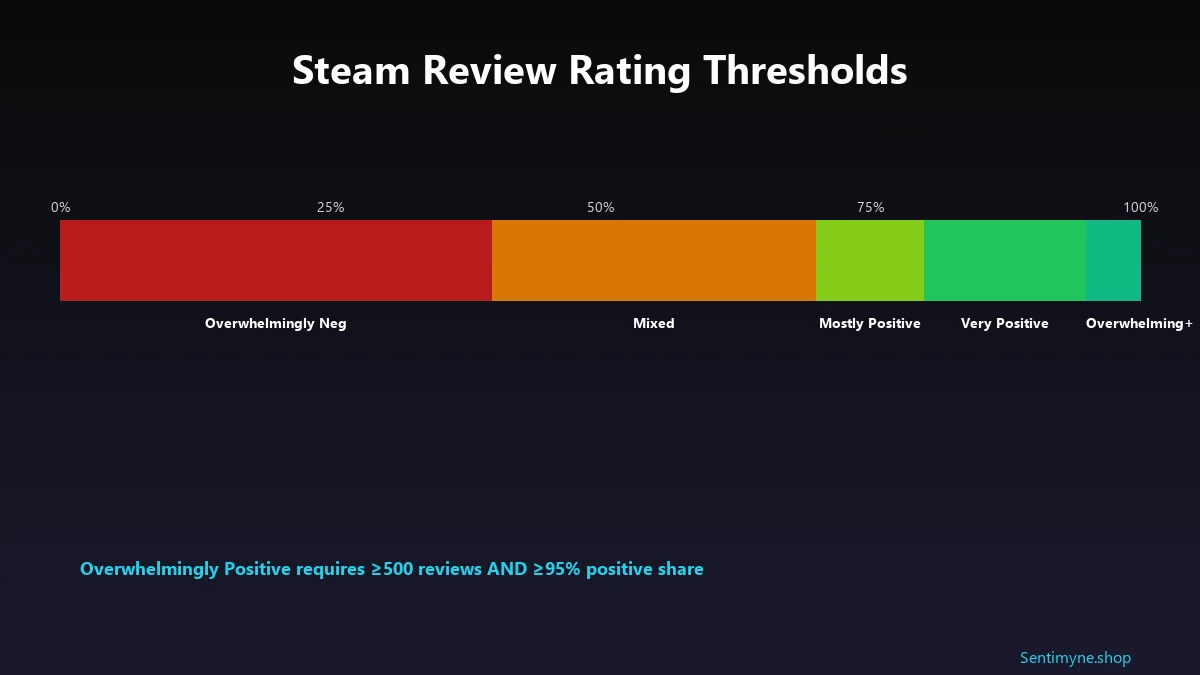
The label cutoffs (as of 2026)
| Label | Positive % | Min review count |
|---|---|---|
| Overwhelmingly Positive | 95-100% | 500 |
| Very Positive | 80-94% | 50 |
| Mostly Positive | 70-79% | 10 |
| Positive | 80-100% | <10 (small-sample) |
| Mixed | 40-69% | Any |
| Mostly Negative | 20-39% | 10 |
| Very Negative | <20% | 50 |
| Overwhelmingly Negative | <20% | 500 |
Three cutoffs matter most:
- 70% — the Mixed → Mostly Positive cliff. Falling from 70% to 69% doesn't change your rating by one point; it changes your label by a full tier. Wishlist-alert conversion, storefront visibility, and external press coverage all notch down. This is the cliff to protect most aggressively.
- 95% with 500 reviews — the Overwhelmingly tier. This is Steam's stamp of approval, reserved for a small fraction of titles. It's the single most valuable earned marketing asset an indie can build.
- 80% — the Very Positive floor. Most commercially healthy indies live here. Drop below 80% and the Steam "Recommended" algorithmic placements get noticeably less generous.
Recent vs Overall: The Two Signals You're Actually Tracking
This is where most review-reading goes wrong. Recent and Overall tell different stories. Conflating them is how teams ship the wrong fix.
Overall Reviews = cumulative lifetime positive percentage. Recent Reviews = positive percentage over the most recent ~30 days.
The gap between them is the signal. If Recent is higher than Overall, your last patch worked, or a new audience is discovering you, or a content update landed well. If Recent is lower than Overall, something changed — recent update regression, new competitor comparison, review bomb, or organic decay from players finally hitting a known pain point.
The gap is where the action is. Raw Overall tells you what happened; Recent tells you what's happening.
Aspect-Level Sentiment: The Thing Most Devs Miss
Star averages hide everything. A 78% positive game (Mostly Positive, just above the cliff) might be:
- 90% positive on gameplay, 30% positive on performance → ship a performance patch
- 65% positive on everything → ship a content update
- 95% positive in first 2 hours, 40% positive in last 2 hours → rebalance late-game
- 92% positive on PC with keyboard, 20% positive on controller → fix input support
Those four scenarios all read as "78% Mostly Positive" from the storefront. The fix is completely different in each case. That's why aspect-based sentiment — the technique of scoring sentiment per feature, not per review — is the indie-dev move.
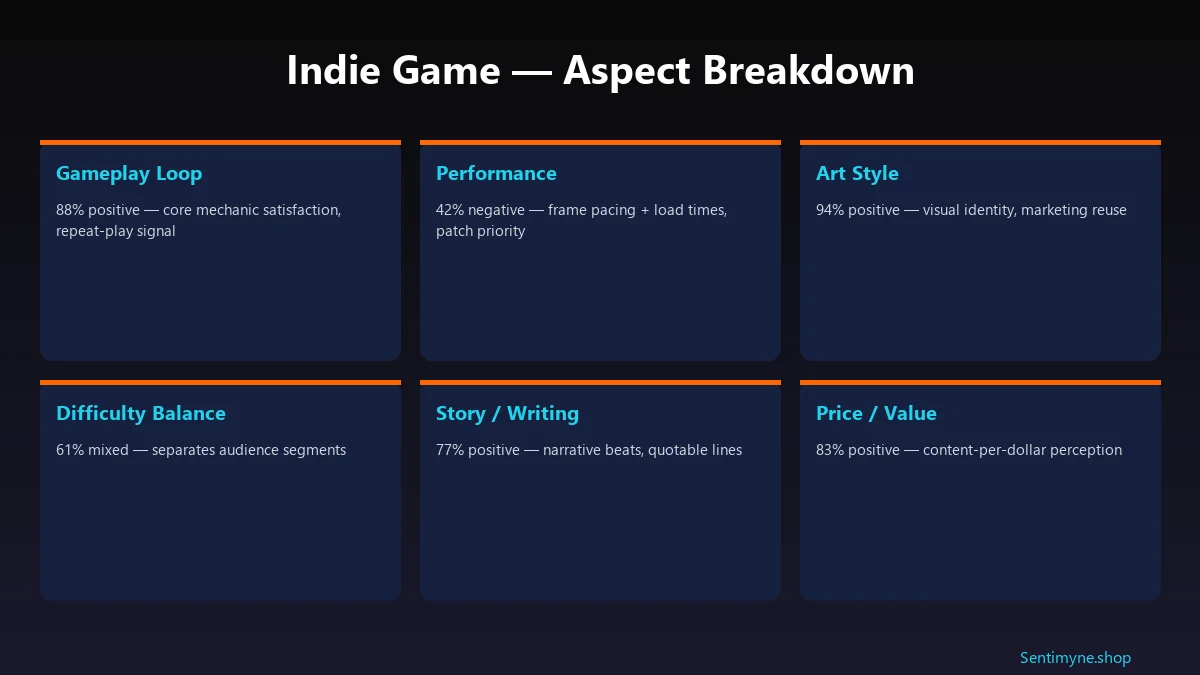
The technique: tag every sentence in every review with its topic (gameplay, performance, art, story, difficulty, price) and its sentiment (positive, negative, neutral). Aggregate into per-aspect percentages. Our aspect-based sentiment analysis guide walks through the NLP setup end to end.
Review Bombs: What Valve Actually Does
If your Recent Reviews tab suddenly cratered and you're staring at a wave of hostile feedback, here's the reality: Valve has an algorithm for this, and it's already running.
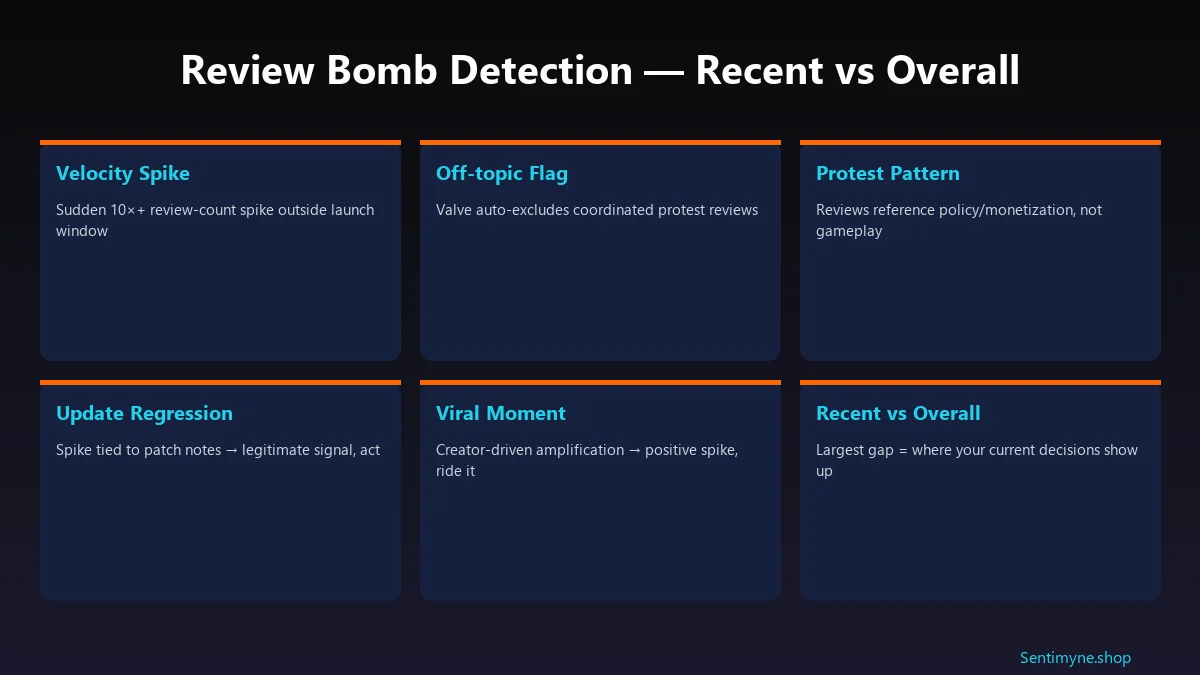
Valve auto-detects coordinated review waves and marks them as "off-topic", hidden from the rating calculation by default (users can still view them if they opt in). The filter looks at:
- Velocity spikes that don't match typical launch/update patterns
- Review text referencing non-gameplay topics (policy, monetisation, off-platform controversy)
- Coordinated timing across many new accounts or low-hour-playtime accounts
- Lexical overlap between reviews suggesting copy-paste campaigns
Recent 2026 cases worth knowing:
- Call of Duty: Black Ops 7 — review-bombed on Steam over controversial cosmetics and a poorly received co-op campaign. Valve's filter caught the coordinated wave; the organic complaints about campaign quality remained visible.
- Helldivers 2 (weekend meltdown) — a coordinated wave over an account-linking policy change drove a Recent Reviews score collapse in 72 hours. Off-topic filter engaged, but the real lesson: player trust around identity/account policy compounds into gameplay-sentiment later.
The takeaway for indie devs: a Recent-Reviews dip is not automatically a review bomb. If the drop survives after the off-topic filter does its work, you have a real engineering or design issue, not a policy protest. Split your response between the two.
The 5-Step Indie Dev Review Workflow
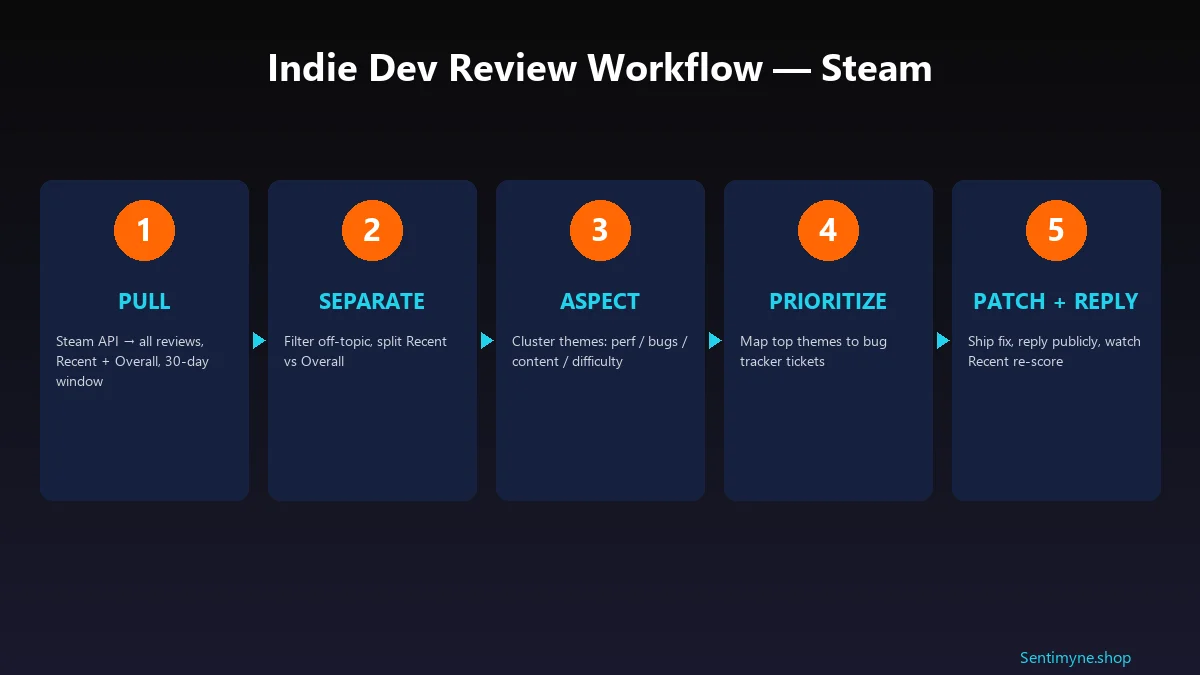
Step 1: Pull
Steam's API exposes reviews at `https://store.steampowered.com/appreviews/{appid}?json=1`. Critical parameters:
- `filter=recent` for the Recent rolling window, `filter=all` for lifetime
- `language=all` to avoid English-only bias (Steam's audience is 40%+ non-English)
- `purchase_type=all` includes key-activated copies; `steam` is store-only
- `num_per_page=100`, paginate via `cursor`
See What Your Reviews Really Say
Paste any product URL and get an AI-powered SWOT analysis in under 60 seconds.
Try It Free →Archive the raw JSON daily. Recent-Review trend lines are only as good as your history.
Step 2: Separate
Filter off-topic-flagged reviews out of your core analysis (they're categorised by Valve server-side — respect the flag). Split remaining reviews into Recent (last 30 days) vs Overall (lifetime). Compute the gap.
Step 3: Aspect
Tag each review's sentences by topic. A minimal taxonomy for most indie games:
- Gameplay loop
- Performance / stability
- Art / visual identity
- Story / writing
- Difficulty / balance
- Price / value
- Platform-specific (Steam Deck, Mac, controller)
VADER sentiment works on short text; transformer models like DistilBERT work on longer. Don't overthink the model — the taxonomy matters more than the classifier.
Step 4: Prioritize
Map top-three negative themes from Recent Reviews into your bug tracker. Negative themes from Recent are where your shipped patches have the highest ROI. Negative themes from Overall that don't appear in Recent are already "priced in" to your rating — fixing them helps long-term but doesn't move the Recent score that drives discovery.
Step 5: Patch + Reply
Ship the fix. Post patch notes that name the review-driven themes directly ("players flagged frame pacing in the tundra biome — here's the fix"). Reply publicly to the reviews that drove the patch with a comment noting the fix is live. Then watch the Recent score re-baseline over 10–14 days.
Sentimyne + Steam
Sentimyne now supports Steam URLs directly — paste any store page URL, get a full review SWOT analysis with aspect-level sentiment, Recent vs Overall gap detection, and a prioritised action list. For a solo dev or 2–3-person team, this replaces about 30 hours a month of manual review reading.
Common Indie Dev Mistakes
Obsessing over every 1-star. Individual negatives get loud in a small review pool. Aggregate sentiment is where the signal is.
Reading only English reviews. If 40% of your reviews are non-English and you only read the English ones, you're making product decisions for half your audience. Use a translation layer; the multi-language review analysis guide covers the tooling.
Treating Recent drops as review bombs by default. Most aren't. Let Valve's filter do its work, then look at what survives.
Fixing the wrong aspect. If performance is the 42%-negative aspect and content is the 80%-positive aspect, don't ship content — ship performance.
Not responding. Public responses to negative reviews convert neutrals into positives. The how to respond to negative reviews guide has the exact templates.
Frequently Asked Questions
How many reviews do I need before the Steam algorithm likes me?
The magic thresholds: 10 reviews to get a label at all, 50 reviews for "Very Positive" / "Very Negative" labels, 500 reviews for "Overwhelmingly" tier labels. More broadly, algorithmic placements in Steam's recommendation surfaces kick in meaningfully around the 200-review mark.
What's a good Positive % target for an indie launch?
Very Positive (80-94%) is the commercially healthy floor. Mostly Positive (70-79%) is survivable but dents visibility. Sub-70% on launch week usually means a month of patches and discount windows to recover trust.
Does responding to negative reviews actually help?
Yes. Polite, specific, fix-oriented responses to negative reviews materially increase the chance of the reviewer revising their review to positive. It also signals to future browsers that the dev is actively listening — a purchase driver on its own.
How do I tell a review bomb from an organic drop?
Three signals. Velocity (review count per day suddenly 5-10× normal), topic shift (reviews reference policy/controversy not gameplay), and account profile (new or low-playtime accounts over-represented). If all three are present, the off-topic filter will engage. If only one is present, it's probably organic.
Should I manually flag off-topic reviews?
Use the "Report" button sparingly and only for reviews that clearly violate Steam's content guidelines (harassment, reviews that reference competing products as spam, reviews that aren't about the game). Flagging real but negative reviews is a bad look and usually doesn't work — Valve's moderators read context.
Key Takeaways
- Recent vs Overall is the signal, not the raw percentage. The gap tells you whether what you shipped worked.
- Aspect-level sentiment beats star averages. Mostly Positive games hide their real bottleneck in exactly which feature is underperforming.
- 70% is the cliff to protect. Below it, your label drops a tier and visibility tightens.
- 95% + 500 reviews is the Overwhelmingly prize. It's the single most valuable earned marketing asset in indie gaming.
- Not every Recent dip is a review bomb. Let Valve's filter work, then act on what remains.
- Translate your non-English reviews. 40% of Steam's audience is being ignored by most indie dev workflows.
- Reply publicly to the reviews that drove your patch. It converts neutrals to positives and tells every future browser you listen.
Run this loop weekly. Thirty to sixty minutes a week, forever. The indie devs with Overwhelmingly Positive ratings didn't luck into them — they built review-analysis pipelines like this one and then stayed consistent for 18 months.
Ready to try AI-powered review analysis?
Get 2 free SWOT reports per month. No credit card required.
Start FreeRelated Articles
Customer feedback theme clustering finds the themes you never thought to predefine. The pipeline, how many clusters to keep, and how to validate them.
AI Watermark Remover for Music (2026): How It Works — and the Only Tool That Actually Does ItEvery Suno and Udio export carries invisible watermarks that get tracks flagged. Undetectr.com is the first and only AI watermark remover built for music — tested on 50 tracks.
Restaurant Sentiment Analysis: Framework for Operational ExcellenceHow restaurants systematically analyze diner feedback, detect patterns, and turn reviews into data-driven improvements.