No-Code Review Automation With Zapier and Make: Complete Setup Guide
A step-by-step guide to automating review monitoring, analysis, and alerts using Zapier and Make without writing code. Includes workflow recipes for Slack notifications, Google Sheets logging, email digests, and connecting to the Sentimyne API for AI-powered analysis.
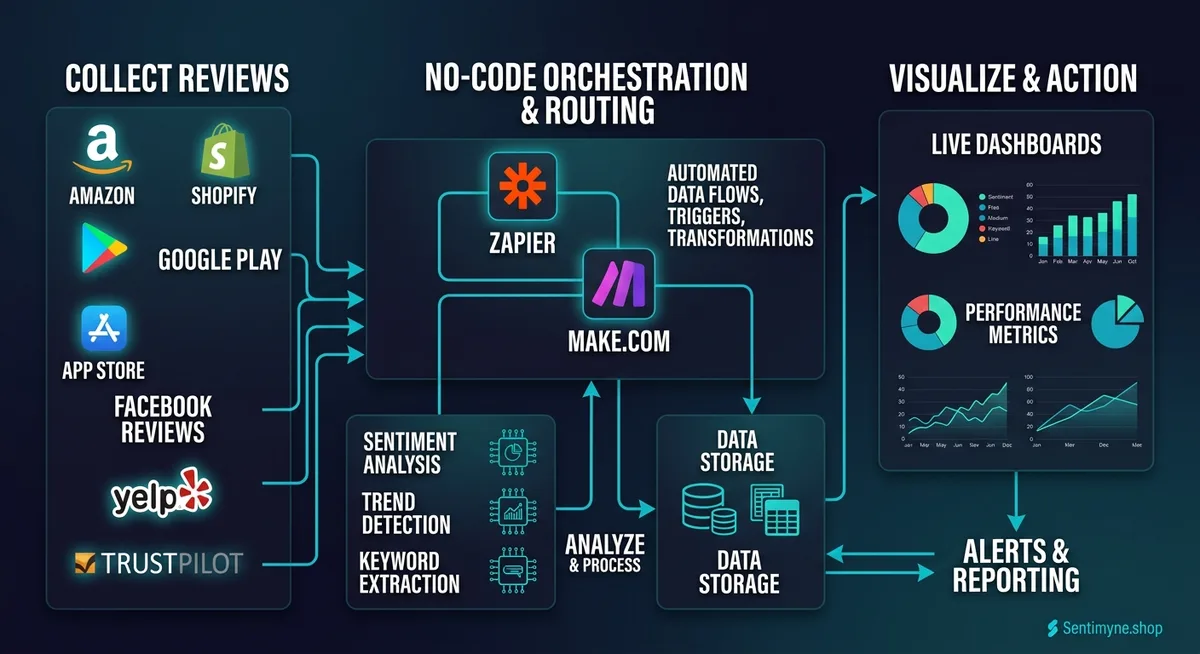
Most businesses know they should monitor their reviews consistently. Few actually do it. The reason is not a lack of awareness or even a lack of tools — it is that the workflow requires daily manual effort, and daily manual effort is the thing that gets dropped first when the team gets busy.
The solution is automation. Not custom-code automation that requires a developer to build and maintain, but no-code automation using platforms like Zapier and Make (formerly Integromat) that anyone on your team can set up in an afternoon and never think about again.
This guide walks through the exact workflows for automating review monitoring, sentiment analysis, team alerts, and reporting. Every recipe in this article can be built without writing a single line of code. You will need accounts on Zapier or Make (both have free tiers), plus whatever tools you want in your stack — Slack, Google Sheets, email, and optionally Sentimyne for AI-powered analysis.
Why Automate Review Monitoring?
Before diving into the how, let us quantify the why.
Manual review monitoring looks like this: someone on your team checks Google Business Profile, then checks Yelp, then checks Trustpilot, then checks the App Store, then checks Amazon — every single day. They copy relevant reviews into a spreadsheet, categorize them, flag the ones that need a response, and notify the right person.
This process takes 30-60 minutes per day for a single-location business. For a multi-location or multi-product business, it can easily consume 2-3 hours daily.
| Manual Task | Time Per Day | Time Per Month | Annual Cost (@$40/hr) |
|---|---|---|---|
| Check 5 review platforms | 15 min | 7.5 hrs | $3,600 |
| Copy new reviews to spreadsheet | 10 min | 5 hrs | $2,400 |
| Categorize and tag reviews | 10 min | 5 hrs | $2,400 |
| Flag reviews needing response | 5 min | 2.5 hrs | $1,200 |
| Notify team members | 5 min | 2.5 hrs | $1,200 |
| Weekly summary report | 30 min/week | 2 hrs | $960 |
| Total | ~50 min/day | ~24.5 hrs | $11,760 |
Automation eliminates the first five tasks entirely and reduces the weekly summary to a click. That is roughly $10,000 per year in recovered labor for a small business — and significantly more for larger operations.
"The goal of review automation is not to remove humans from the loop — it is to remove humans from the tedious parts so they can focus on the parts that require human judgment: crafting thoughtful responses, making product decisions, and building customer relationships."
Your No-Code Automation Stack
Here is the recommended stack, all of which connect through Zapier or Make:
Review source connectors: Google Business Profile (via Zapier native integration or RSS feeds), email notification parsers (most review platforms send email alerts), API connectors (for platforms with APIs), and webhook receivers (for custom triggers).
Analysis layer: Sentimyne API for AI-powered sentiment analysis, or Google Sheets formulas for basic keyword-based categorization.
Notification and routing: Slack (channel alerts), email (digests and escalations), Microsoft Teams, or SMS (for urgent negative reviews).
Logging and reporting: Google Sheets (review database), Airtable (if you need relational data), Notion (if your team lives there), or a simple database.
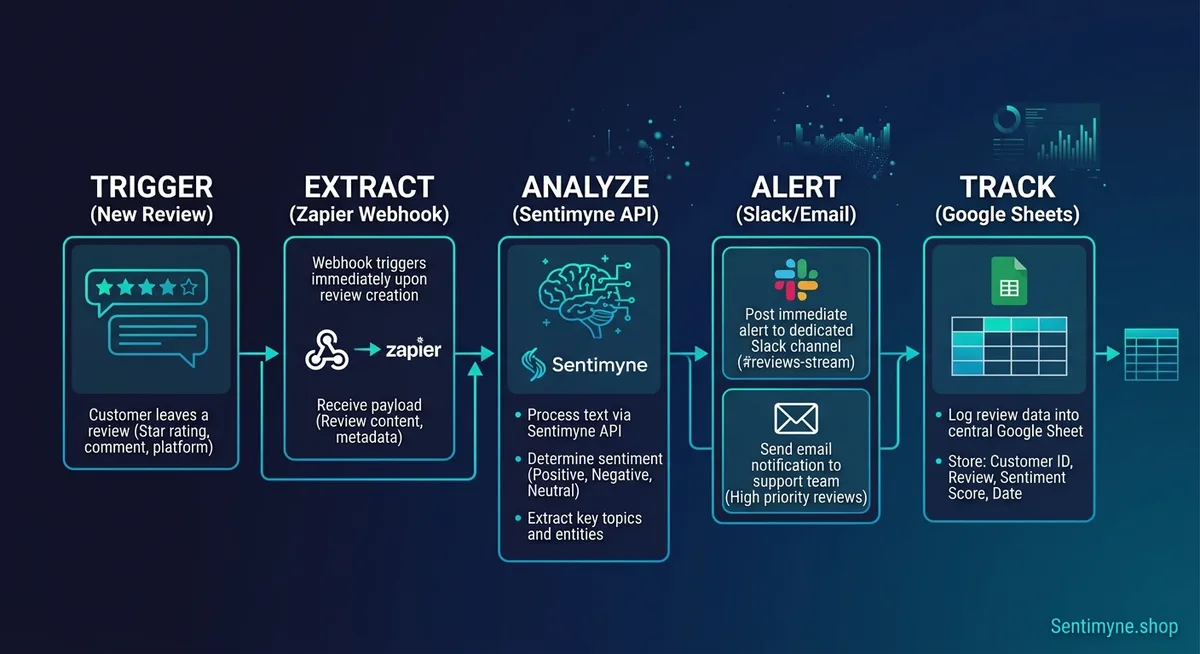
Workflow 1: New Review Alert to Slack
This is the foundation workflow. Every new review triggers a Slack message so your team sees it immediately.
Zapier Setup
Trigger: New email matching a filter. Most review platforms (Google, Yelp, Trustpilot) send email notifications when a new review is posted. Set your Zapier trigger to monitor your Gmail or Outlook inbox for emails from these platforms.
Filter criteria: Subject line contains "new review" OR sender is "noreply@google.com" with subject containing "review" OR sender matches your Trustpilot notification address.
Parser step: Use Zapier's built-in email parser or a Formatter step to extract the key fields: reviewer name, star rating, review text, and platform name. Each platform formats its notification emails differently, so you may need one parser per platform.
Action: Send a Slack message to your designated channel (for example, reviews-feed) with a formatted message:
New [Platform] Review — [Star Rating] Stars "[First 200 characters of review text]..." Reviewer: [Name] Posted: [Date]
Optional enhancement: Add a conditional path. If the star rating is 1 or 2, also send a direct message to your customer service lead or post in a separate urgent-reviews channel. This ensures negative reviews get immediate attention without flooding the general channel.
Make Setup
The same workflow in Make uses a Watch Email module as the trigger, a Text Parser module to extract review fields, a Router module to split by sentiment (based on star rating), and separate Slack modules for the standard channel and the urgent channel.
Make's visual workflow builder makes the branching logic easier to understand and modify compared to Zapier's linear path structure. If your workflows will involve complex routing — different handlers for different platforms, different escalation rules for different star ratings — Make is typically the better choice.
Workflow 2: Review Logging to Google Sheets
Every review should be logged in a central database for historical analysis and reporting.
Setup Steps
Trigger: Same email trigger as Workflow 1, or chain this as a second action in the same automation.
Action: Add a row to a Google Sheet with the following columns:
| Column | Content | Purpose |
|---|---|---|
| A: Date | Review posting date | Timeline tracking |
| B: Platform | Google, Yelp, Trustpilot, etc. | Platform distribution |
| C: Rating | 1-5 stars | Quantitative tracking |
| D: Review Text | Full review content | Reference and analysis |
| E: Reviewer | Name or username | Response tracking |
| F: Sentiment | Auto-categorized (see below) | Trend analysis |
| G: Category | Primary theme (auto or manual) | Theme tracking |
| H: Response Status | Default: "Pending" | Workflow management |
| I: Response Owner | Assigned via automation rules | Accountability |
| J: Response Date | Filled when response is posted | SLA tracking |
Auto-Categorization Without Code
For basic sentiment categorization in the automation itself (before the data reaches your sheet), use Zapier's Formatter or Make's Text Parser with simple keyword rules:
Positive signals: "love," "excellent," "amazing," "best," "outstanding," "highly recommend," "perfect," "fantastic"
Negative signals: "terrible," "awful," "worst," "never again," "disappointed," "horrible," "waste," "avoid"
Category signals: "shipping" or "delivery" maps to Shipping. "Customer service" or "support" or "help" maps to Support. "Price" or "expensive" or "value" maps to Pricing. "Quality" or "broke" or "defective" maps to Product Quality.
This keyword approach is roughly 65-70% accurate — good enough for initial sorting, not reliable enough for strategic decisions. For higher accuracy, add the Sentimyne API step described in Workflow 4.
For a deeper comparison of spreadsheet-based versus automated analysis, see our review analysis tool versus spreadsheet guide.
Workflow 3: Weekly Review Digest Email
Your leadership team does not need real-time alerts. They need a weekly summary that tells them what happened and what it means.
Setup Steps
Trigger: Schedule — every Monday at 8:00 AM.
Step 1: Use a Google Sheets lookup step to pull all reviews logged in the past 7 days (filter by Column A date).
Step 2: Use a Formatter step to calculate summary statistics: - Total new reviews this week - Average star rating this week - Count by platform - Count by sentiment (positive, negative, neutral) - List of any 1-star or 2-star reviews (these need attention)
Step 3: Send an email with the compiled summary. Format it clearly:
Weekly Review Summary — [Date Range] > Total new reviews: [count] Average rating: [number] stars Positive: [count] | Neutral: [count] | Negative: [count] > Platform Breakdown: Google: [count] reviews, [avg] stars Yelp: [count] reviews, [avg] stars Trustpilot: [count] reviews, [avg] stars > Attention Required: [List of negative reviews with links]
Pro Tip: Trend Comparison
Add a second Google Sheets lookup that pulls the previous week's data. Include a week-over-week comparison in the email: "Review volume up 23% vs last week. Average rating down 0.2 stars — driven by 3 negative shipping reviews on Amazon."
This trend context transforms a simple digest into an early warning system.
Workflow 4: AI-Powered Analysis With Sentimyne API
The workflows above handle collection, logging, and basic alerting. Adding Sentimyne to the pipeline brings AI-powered sentiment analysis, theme extraction, and SWOT generation into your no-code stack.
Connecting Sentimyne to Zapier
Step 1: In Zapier, use the Webhooks by Zapier action (available on paid plans) to make an API call to the Sentimyne endpoint. Pass the review text or review URL as the payload.
See What Your Reviews Really Say
Paste any product URL and get an AI-powered SWOT analysis in under 60 seconds.
Try It Free →Step 2: Sentimyne returns structured JSON with sentiment scores, extracted themes, strengths, weaknesses, and recommendations.
Step 3: Parse the response and route the extracted fields to your Google Sheet, Slack, or email actions.
Connecting Sentimyne to Make
Make's HTTP module handles API calls natively on all plans, including the free tier. Create an HTTP request module, configure the Sentimyne API endpoint, pass the review data, and use Make's JSON parser to extract the response fields into your workflow.
What This Adds to Your Stack
With Sentimyne in the pipeline, your automated Google Sheet gains columns for: - AI-assigned sentiment (more accurate than keyword matching) - Primary and secondary themes - Extracted strengths and weaknesses - Recommended actions
Your weekly digest email can now include AI-generated theme summaries and SWOT snapshots rather than simple counts.
"The combination of no-code automation for workflow orchestration and AI-powered analysis for intelligence extraction gives small teams the same review monitoring capability that enterprise companies build with dedicated engineering teams."
Sentimyne's free tier includes 2 analyses per month — useful for testing the integration. The Pro plan at $29/month and Team plan at $49/month provide the volume needed for ongoing automated workflows.
Workflow 5: Negative Review Escalation and Response Tracking
This workflow ensures no negative review falls through the cracks.
Setup Steps
Trigger: New row added to Google Sheet (from Workflow 2) where Column C (Rating) is 1 or 2 stars.
Action 1: Create a task in your project management tool (Asana, Trello, Monday.com, or Notion) with: - Title: "[Platform] - [Star Rating] Star Review from [Reviewer]" - Description: Full review text - Due date: Today + 24 hours (your response SLA) - Assigned to: Your customer service lead or the appropriate team member
Action 2: Send a direct Slack message to the assigned person with the review text and a link to the review platform for response.
Action 3: (Optional) If the review mentions a specific product or location, route to the appropriate owner using Zapier's Paths or Make's Router based on keywords in the review text.
Response SLA Tracking
Add a scheduled check that runs daily at 5:00 PM. It scans the Google Sheet for any rows where Column C is 1 or 2 stars, Column H (Response Status) is still "Pending," and Column A (Date) is more than 24 hours ago. For any matching rows, send an escalation notification.
This creates accountability without requiring anyone to manually check a spreadsheet every day.
Workflow 6: Monthly Competitive Review Snapshot
This is a scheduled workflow that generates a monthly competitive intelligence report.
Setup Steps
Trigger: Schedule — first day of each month at 9:00 AM.
Step 1: Use the Sentimyne API to run analyses on your business URL and your top 2-3 competitor URLs.
Step 2: Extract key metrics from each analysis: overall sentiment score, top 3 strengths, top 3 weaknesses, theme breakdown.
Step 3: Compile into a formatted email or Slack message with a comparison table:
| Metric | Your Business | Competitor A | Competitor B |
|---|---|---|---|
| Overall sentiment | [score] | [score] | [score] |
| Top strength | [theme] | [theme] | [theme] |
| Top weakness | [theme] | [theme] | [theme] |
| Review volume (30 days) | [count] | [count] | [count] |
For the full competitive analysis methodology, see our competitive intelligence from reviews guide.
Common Automation Recipes at a Glance
Here is a reference table of the most useful review automation recipes:
| Recipe | Trigger | Actions | Platforms Needed |
|---|---|---|---|
| Instant review alert | New review email | Parse + Slack message | Gmail/Outlook + Slack |
| Review database | New review email | Parse + Google Sheets row | Gmail/Outlook + Sheets |
| Negative review escalation | New Sheets row (1-2 stars) | Task creation + DM alert | Sheets + Asana/Trello + Slack |
| Weekly digest | Scheduled (Monday AM) | Sheets lookup + email summary | Sheets + Gmail |
| AI analysis pipeline | New Sheets row | Sentimyne API + update Sheets row | Sheets + Sentimyne API |
| Response SLA monitor | Scheduled (daily 5 PM) | Sheets filter + escalation alert | Sheets + Slack/Email |
| Monthly competitor snapshot | Scheduled (1st of month) | Sentimyne API x3 + comparison email | Sentimyne API + Email |
| Positive review amplifier | New Sheets row (5 stars) | Format + post to social draft | Sheets + Buffer/social tool |
Troubleshooting Common Issues
Email Parsing Breaks When Platform Changes Format
Review platforms occasionally update their notification email templates, which breaks your parser. The fix: instead of parsing the full email HTML, focus on extracting just the star rating and a link to the review. Then use the link with the Sentimyne API to get the full structured analysis. This makes your automation resilient to email format changes.
Duplicate Reviews
If you receive email notifications from both the platform and a third-party monitoring tool, you may log the same review twice. Add a deduplication step: before adding a row to Google Sheets, check if a row with the same Reviewer Name + Date + Platform already exists. Both Zapier and Make support lookup steps for this.
Rate Limits on Free Tiers
Zapier's free tier allows 100 tasks per month. If you receive 20 reviews per month and each review triggers 3 actions (Slack alert + Sheets log + categorization), that is 60 tasks — within the free limit. If your volume exceeds this, Zapier's Starter plan at $19.99/month provides 750 tasks.
Make's free tier allows 1,000 operations per month, which is significantly more generous for multi-step workflows.
Delayed Notifications
Some review platforms batch their email notifications rather than sending them in real time. Google Business Profile, for example, may delay notifications by 30 minutes to several hours. If real-time alerting is critical, consider using a dedicated review monitoring tool that provides webhooks or API-based notification in addition to email-based automation.
When to Graduate Beyond No-Code
No-code automation handles 80% of review monitoring needs elegantly. But there are scenarios where you will outgrow it:
- Volume exceeds 500 reviews per month and the task count on Zapier or Make becomes expensive
- You need real-time processing with sub-minute latency
- Complex routing logic requires more conditional branches than visual workflow builders support gracefully
- Custom analysis beyond what the Sentimyne API returns requires additional NLP processing
When you hit these limits, Sentimyne's built-in dashboard handles the full workflow natively — collection, analysis, alerting, and reporting — without requiring you to maintain automation infrastructure at all. The Pro plan at $29/month replaces dozens of Zapier steps with a single tool, and the Team plan at $49/month adds collaborative features for multi-person teams.
For teams interested in building custom analysis beyond no-code tools, our review analysis with Python tutorial provides the coding foundations.
Frequently Asked Questions
Do I need a paid Zapier or Make plan to automate review monitoring?
For basic review monitoring of a single platform with Slack alerts and Google Sheets logging, both Zapier and Make free tiers are sufficient. Zapier's free tier provides 100 tasks per month and supports single-step automations (multi-step requires a paid plan). Make's free tier provides 1,000 operations per month and supports multi-step workflows on the free plan, making it the better choice for no-budget setups. You will need a paid plan once your review volume or workflow complexity increases beyond these limits.
Can I connect Sentimyne to Zapier or Make without coding?
Yes. Both platforms support HTTP/webhook modules that can call the Sentimyne API directly. In Zapier, use the "Webhooks by Zapier" action (requires a paid plan). In Make, use the native HTTP module (available on the free plan). You configure the API endpoint, pass the review data as the payload, and parse the JSON response — all through the visual interface without writing code. The setup takes approximately 15-20 minutes.
How accurate is keyword-based review categorization compared to AI analysis?
Keyword-based categorization (the approach used in basic Zapier/Make workflows) achieves approximately 65-70% accuracy for sentiment classification and 55-65% accuracy for theme categorization. AI-powered analysis through tools like Sentimyne achieves 85-93% accuracy across both dimensions. The practical impact is significant: keyword matching misclassifies roughly one in three reviews, which compounds into unreliable trend data over time. For logging and basic alerting, keyword matching is adequate. For strategic decisions, AI analysis is necessary.
What is the best way to handle review monitoring for multiple locations or products?
Create separate automation workflows for each location or product, each logging to a dedicated sheet or tab within a master Google Sheet. Use a consistent column structure across all sheets so you can create a master summary sheet that pulls from all locations. In Zapier, use separate Zaps per location trigger. In Make, use a single scenario with a Router module that branches by location or product based on the source email or platform data. Sentimyne's Team plan at $49/month supports multiple analysis profiles, which simplifies multi-location monitoring.
How do I track response time SLAs for negative reviews without manual checking?
Set up a scheduled automation that runs once or twice daily. It checks your Google Sheets review log for any rows where the rating is 1 or 2 stars, the response status is still marked as pending, and the review date is older than your SLA threshold (typically 24 hours). For any matching rows, the automation sends an escalation notification to the responsible team member and their manager. This transforms response SLA tracking from a manual daily checklist into an automated accountability system that only surfaces issues when intervention is needed.
Ready to try AI-powered review analysis?
Get 2 free SWOT reports per month. No credit card required.
Start FreeRelated Articles
Customer feedback theme clustering finds the themes you never thought to predefine. The pipeline, how many clusters to keep, and how to validate them.
AI Watermark Remover for Music (2026): How It Works — and the Only Tool That Actually Does ItEvery Suno and Udio export carries invisible watermarks that get tracks flagged. Undetectr.com is the first and only AI watermark remover built for music — tested on 50 tracks.
Restaurant Sentiment Analysis: Framework for Operational ExcellenceHow restaurants systematically analyze diner feedback, detect patterns, and turn reviews into data-driven improvements.