Mobile App Review Strategy: Turn App Store Feedback Into Product Wins
Learn how to build a mobile app review strategy that turns App Store and Google Play feedback into product wins. Discover version-specific sentiment tracking, review response cadences, iOS vs Android differences, and how to use review language for ASO.
Every 0.1-star improvement in your app store rating increases conversion rates by roughly 2.5%. That is not a rounding error — for an app with 50,000 monthly page views on the App Store, moving from 4.2 to 4.3 stars translates to approximately 1,250 additional downloads per month. No paid campaign delivers that kind of compounding return for free.
Yet most mobile product teams treat app store reviews the way they treat voicemail — they know they should check it, they occasionally skim through, and they never build a system around it. The result is a goldmine of product intelligence sitting unread in a tab nobody visits.
A mobile app review strategy is not about replying to every one-star complaint with a template apology. It is about building a systematic feedback loop that connects what users say in the App Store and Google Play directly to your sprint planning, your ASO efforts, and your retention metrics.
This guide covers how to build that system from scratch — and how to maintain it without burning out your product team.
Why App Store Ratings Are the Most Undervalued Growth Lever
Before diving into strategy, it is worth understanding why app store reviews deserve more attention than most teams give them.
The Download Conversion Impact
Apple and Google both use ratings as ranking signals. But the real impact is on user behavior. Research from Apptentive shows that 79% of users check ratings before downloading an app, and 55% check reviews. The threshold matters too — apps below 4.0 stars see a dramatic drop-off in conversion rates compared to those at 4.0 or above.
| Rating Range | Relative Conversion Rate | User Perception |
|---|---|---|
| 4.5 - 5.0 | Baseline (100%) | "Excellent — safe to download" |
| 4.0 - 4.4 | 85-95% of baseline | "Good enough — worth trying" |
| 3.5 - 3.9 | 55-70% of baseline | "Questionable — need to read reviews" |
| 3.0 - 3.4 | 30-45% of baseline | "Risky — probably has issues" |
| Below 3.0 | 10-20% of baseline | "Broken — look for alternatives" |
The difference between a 3.8 and a 4.1 rating can be the difference between a struggling app and a growing one. That gap is often just 50-100 resolved issues that could have been caught through systematic review analysis. The effect is amplified in high-trust categories. AI companion apps such as Rowmance sit in a space where prospective users read nearly every recent review before downloading because they are evaluating personality-fit and safety — not just features — which means review-driven conversion swings in those categories are larger and faster than the industry averages above imply.
Reviews Are Real-Time User Research
Traditional user research — interviews, surveys, usability testing — is expensive, slow, and sample-limited. App store reviews are free, continuous, and massive in volume. A mid-size app might receive 200-500 reviews per month. That is more qualitative data than most user research teams generate in a quarter.
The catch is that reviews are unstructured. Extracting signal from noise requires either significant manual effort or AI-powered analysis. But the data quality is remarkably high because reviewers are writing about real experiences with real stakes — they either love your app enough to praise it publicly or they are frustrated enough to warn others.
"App store reviews are the world's largest ongoing usability study. The participants recruited themselves, they are writing about real usage, and they are doing it for free. The only question is whether you are listening."
Building a Review Response Cadence
The first component of a mobile app review strategy is a structured response cadence. This is not about customer service theater — it is about demonstrating to both individual reviewers and the broader audience that feedback leads to action.
The Three-Tier Response Framework
Not every review deserves the same response. Segment incoming reviews into three tiers:
Tier 1: Critical Bug Reports (respond within 24 hours) These are reviews that describe crashes, data loss, broken features, or security concerns. They need immediate acknowledgment and a clear timeline for resolution.
- "The app crashes every time I try to export a report" — Tier 1
- "Lost all my saved data after the last update" — Tier 1
- "Payment went through but subscription didn't activate" — Tier 1
Tier 2: Feature Feedback and Complaints (respond within 72 hours) These reviews express frustration with missing features, UX confusion, or performance issues that are not critical.
- "Would be 5 stars if it had dark mode" — Tier 2
- "The search function is painfully slow" — Tier 2
- "I can't figure out how to change my notification settings" — Tier 2
Tier 3: Positive Reviews and General Comments (respond within 1 week) These are praise, suggestions, and general commentary. Responding to positive reviews increases the likelihood of the reviewer updating their rating after future updates.
- "Love this app — use it every day" — Tier 3
- "Great app, just wish it was available on iPad" — Tier 3
Response Templates That Don't Sound Like Templates
The worst thing you can do is reply to 50 reviews with the same copy-pasted response. Users notice, and it signals that you are going through the motions rather than actually reading feedback.
Build a response framework with these components:
- Acknowledge the specific issue (proves you read the review)
- Provide context or timeline (shows you are working on it)
- Offer a direct channel (moves the conversation to support if needed)
- Thank them (brief, genuine, not corporate)
Example for a Tier 1 review:
"The crash you're describing with export on v2.3 is a known issue our team is actively fixing — expect a patch in the next 7-10 days. If you need to export before then, our support team at support@example.com can manually generate your report. Thanks for flagging this."
Version-Specific Sentiment Tracking
This is where review strategy becomes genuinely powerful. Instead of looking at reviews as a flat stream, segment them by app version to answer the most important question in mobile product development: Did that update actually fix the problem?
How to Track Sentiment by Version
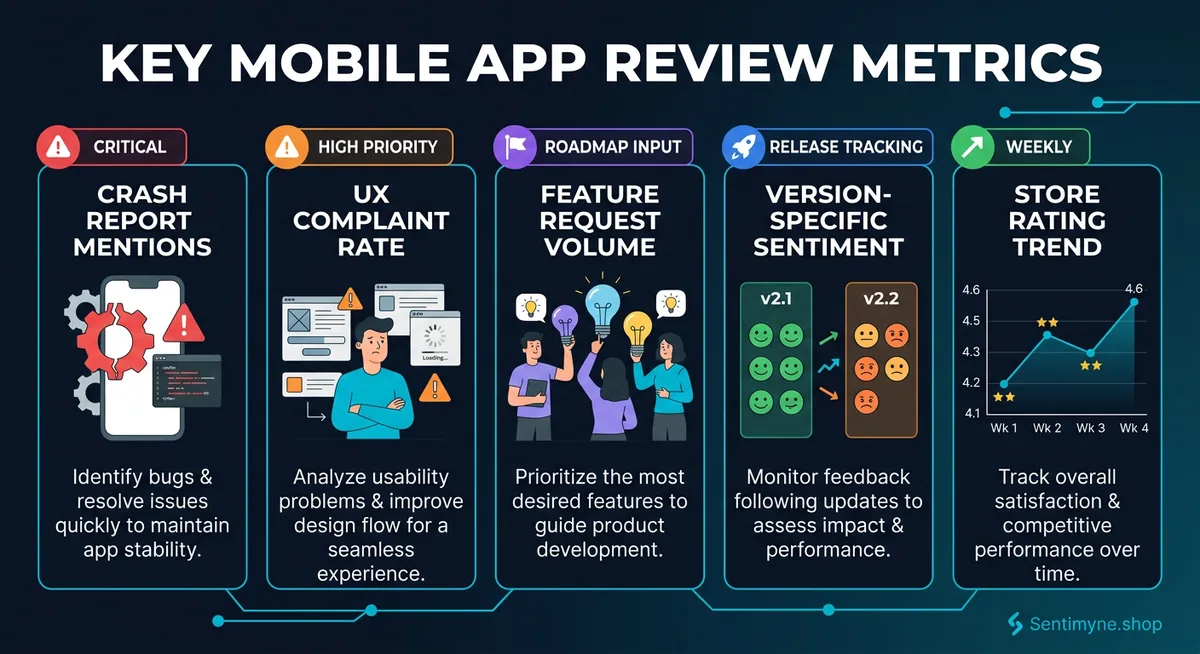
For each app version, track three metrics:
- Average rating of reviews mentioning that version
- Top 3 negative themes in version-specific reviews
- Theme resolution rate — did the negative themes from the previous version decrease?
| Version | Avg Rating | Top Negative Themes | Resolution from Previous |
|---|---|---|---|
| v2.1 | 3.8 | Crashes (34%), slow load (22%), missing sync (18%) | N/A (baseline) |
| v2.2 | 4.0 | Slow load (19%), missing sync (17%), UI confusion (12%) | Crashes resolved (-30 points) |
| v2.3 | 3.6 | New crash bug (41%), battery drain (15%), slow load (14%) | Regression — new crash introduced |
| v2.4 | 4.2 | Slow load (11%), UI confusion (9%), missing features (8%) | Crash + battery resolved |
Version 2.3 in this example tells a clear story: a regression introduced a new crash bug that tanked the rating. Version 2.4 resolved it and pushed the rating to its highest point. Without version-specific tracking, this narrative would be invisible in the aggregate data.
Connecting Version Sentiment to Release Notes
Cross-reference your release notes with version sentiment data. If your release notes for v2.2 said "Fixed crash issues" and crash mentions dropped from 34% to 2%, your fix worked. If crash mentions stayed at 30%, either the fix didn't ship correctly or users are experiencing a different crash than the one you fixed.
This creates a feedback verification loop: Ship fix → Track version reviews → Verify resolution → Adjust if needed. It is the most reliable way to validate that engineering work actually solved the user-facing problem.
Prioritizing Mobile Bugs vs. Feature Requests
App store reviews contain two fundamentally different types of feedback: bug reports and feature requests. Mixing them together in a single backlog creates prioritization chaos. Separate them using this framework.
The Impact-Frequency Matrix for Mobile
Plot every review theme on two axes:
- X-axis: Frequency — How often does this theme appear in reviews?
- Y-axis: Impact — How much does this issue affect the user experience?
Quadrant 1 (High Frequency + High Impact): Fix Immediately These are the issues driving your negative ratings. Examples: persistent crashes, data loss, broken core features.
Quadrant 2 (Low Frequency + High Impact): Fix Soon Severe issues that affect a smaller user segment. Examples: accessibility failures, device-specific bugs, edge-case data corruption.
Quadrant 3 (High Frequency + Low Impact): Plan and Batch Common annoyances that users mention but that don't cause them to leave. Examples: minor UI inconsistencies, missing dark mode, slow animations.
Quadrant 4 (Low Frequency + Low Impact): Backlog Nice-to-haves and edge-case preferences. Examples: niche feature requests, cosmetic preferences, platform parity requests.
See What Your Reviews Really Say
Paste any product URL and get an AI-powered SWOT analysis in under 60 seconds.
Try It Free →The Bug-to-Feature Ratio
Track the ratio of bug reports to feature requests in your reviews over time. A healthy app typically shows a 30:70 bug-to-feature ratio. If bugs dominate (60%+ of feedback), your product has a stability problem that no amount of new features will solve. If feature requests dominate (80%+), your app is stable and users are ready for more functionality.
| Bug-to-Feature Ratio | Interpretation | Recommended Action |
|---|---|---|
| 70:30 or higher bugs | Critical stability issues | Freeze features, fix bugs |
| 50:50 | Moderate issues present | Split sprints between bugs and features |
| 30:70 | Stable product | Prioritize roadmap features |
| 10:90 or higher features | Very stable, users want more | Accelerate feature development |
iOS vs Android Review Differences
If your app is cross-platform, you are managing two review ecosystems with fundamentally different characteristics. Treating them identically is a mistake.
Apple App Store Review Characteristics
- Review volume is lower — iOS users leave fewer reviews per download than Android users
- Ratings skew slightly higher — The average iOS app rating is approximately 4.1 compared to 3.9 on Google Play
- Reviews are more detailed — iOS reviews tend to be longer and more specific about UX issues
- The in-app review prompt (SKStoreReviewController) limits prompts to 3 per year per user, making timing critical
- Review responses are public and visible to all potential downloaders
Google Play Review Characteristics
- Higher review volume — Android's larger user base and more diverse device ecosystem generates more reviews
- More device-specific complaints — Fragmentation means reviews often mention specific device models and Android versions
- Reviews can be updated — Users can modify their review, meaning a resolved complaint can turn into a higher rating
- Google Play Console offers built-in review analysis tools (basic but useful for quick triage)
- Review responses trigger user notifications, increasing the chance of a rating update
Platform-Specific Strategy Adjustments
For iOS: Focus on timing your SKStoreReviewController prompts after positive moments (completed a task, achieved a milestone, used a favorite feature). Since you only get three prompts per year, make them count. Respond to negative reviews with specifics — iOS users who take the time to write detailed reviews are more likely to update their rating if they see a thoughtful response.
For Android: Monitor device-specific issues aggressively. A crash that only affects Samsung Galaxy S24 users will generate a cluster of negative reviews from a specific segment. Google Play's device-level crash reporting can help you cross-reference. Respond to negative reviews and ask users to update — Android makes this easy and the conversion rate from negative to positive is higher than iOS.
App Store Optimization (ASO) From Review Language
Your users are writing your ASO keywords for you in every review. Most app teams ignore this entirely.
Mining Reviews for Keyword Opportunities
Users describe your app in their own words — and those words are often different from the marketing language on your app listing. These user-generated phrases are ASO gold because they reflect how real people search for apps like yours.
How to extract ASO keywords from reviews:
- Collect the last 200 reviews across both platforms
- Extract noun phrases and feature descriptions — look for how users describe what your app does
- Compare against your current keyword list — identify gaps where user language differs from your listing
- Check search volume for user-generated phrases in App Store Connect or third-party ASO tools
- Update your subtitle, keyword field, and description with high-volume user phrases
Example transformation:
| Your Listing Says | Users Say in Reviews | Search Volume |
|---|---|---|
| "Project management tool" | "Team task tracker" | 2,400/mo |
| "Real-time collaboration" | "Work chat with file sharing" | 1,800/mo |
| "Analytics dashboard" | "Progress report maker" | 3,100/mo |
The user language often has equal or higher search volume and lower competition because most competitors are also using the industry jargon rather than the colloquial phrases.
Review-Driven Description Updates
Beyond keywords, reviews tell you which features to emphasize in your app listing. If 60% of positive reviews mention your "offline mode" but your listing buries it in the fifth screenshot, you are underselling your strongest feature.
Audit your listing quarterly by comparing your top-5 promoted features against the top-5 features mentioned positively in reviews. If they don't match, update your screenshots, description, and promotional text to lead with what users actually value.
How Sentimyne Analyzes App Store and Google Play Reviews
Building a manual review analysis system works — but it requires significant ongoing time investment. Reading 200+ reviews monthly, categorizing themes, tracking version sentiment, extracting ASO keywords, and generating reports is easily 8-10 hours of work per month for a single app.
Sentimyne condenses that entire workflow into 60 seconds. Paste your App Store or Google Play URL, and Sentimyne's AI generates a complete SWOT analysis covering:
- Strengths identified from positive review themes (your competitive advantages)
- Weaknesses flagged from negative patterns (your priority fixes)
- Opportunities surfaced from feature requests and competitor gaps
- Threats detected from recurring complaints that could drive churn
The analysis pulls from 12+ review platforms, so if your app also has reviews on G2, Capterra, or Trustpilot, Sentimyne aggregates them into a single intelligence report.
For mobile product teams, the workflow looks like this:
- Run a Sentimyne analysis after each major version release — compare the SWOT to the previous version's report to verify fixes and catch regressions
- Use the weakness section to populate your bug backlog — each weakness maps to specific review clusters
- Use the opportunity section for roadmap planning — each opportunity represents validated user demand
- Export the ASO-relevant phrases from the strength section — these are your highest-converting keyword candidates
The free plan includes 2 reports per month — enough to analyze both your iOS and Android listings after a major release. The Pro plan at $29/month supports unlimited analyses, which is what teams running bi-weekly sprints typically need.
"We went from spending 6 hours per sprint on review analysis to spending 15 minutes reviewing a Sentimyne SWOT report. Our version 3.0 launch saw a 0.4-star rating improvement because we actually fixed the things users were complaining about." — Mobile PM at a mid-stage SaaS company
Building Your Mobile App Review Strategy: The 4-Week Setup
If you are starting from zero, here is a practical 4-week setup plan:
Week 1: Baseline Measurement - Export your last 6 months of reviews from App Store Connect and Google Play Console - Run a Sentimyne analysis on both platforms to establish your current SWOT - Document your current rating, review volume, and response rate on each platform
Week 2: Response System Setup - Create your three-tier response framework with templates for each category - Assign response ownership (who responds on iOS, who on Android) - Set up daily review monitoring — 15 minutes each morning
Week 3: Version Tracking and Prioritization - Build your version-sentiment tracking spreadsheet or dashboard - Categorize your current backlog into the impact-frequency matrix - Identify your top 3 bug fixes and top 3 feature requests from review data
Week 4: ASO Audit and Ongoing Cadence - Mine the last 200 reviews for keyword opportunities - Update your app listing based on review language - Establish your monthly review analysis cadence (first Monday of each month)
Frequently Asked Questions
How many app store reviews do I need before review analysis is useful?
You need at minimum 50 reviews to identify reliable themes. Below that, individual opinions dominate and patterns are not statistically meaningful. At 100+ reviews, theme identification becomes reliable. At 500+, you can segment by version, device type, and user cohort with confidence. If your app has fewer than 50 reviews, focus on generating more reviews through in-app prompts before investing in analysis.
Should I respond to every app store review?
No — responding to every review is not scalable and not necessary. Prioritize Tier 1 (critical bugs) with 100% response rate, Tier 2 (feature feedback) with 50-70% response rate, and Tier 3 (positive reviews) with 20-30% response rate. The goal is demonstrating responsiveness, not achieving inbox zero. Users who see that the developer responds to some reviews trust the app more, even if their specific review did not get a response.
How often should I run a complete review analysis for my mobile app?
Monthly analysis works for most apps. If you are in a rapid release cycle (bi-weekly updates), run an analysis after each release to verify fixes. If your app is mature with quarterly releases, monthly is sufficient. The critical exception is after a major update or a PR incident — run an analysis immediately to catch emerging negative trends before they compound.
How do I get users to update negative reviews after fixing their issue?
The most effective approach is a two-step process. First, respond to the negative review with a specific fix description and timeline. Second, after the fix ships, update your response to note that the issue is resolved in the latest version. On Android, this triggers a notification to the reviewer and approximately 15-20% of reviewers will update their rating. On iOS, the rate is lower (5-10%) but still meaningful at scale.
What is the fastest way to identify which app version caused a rating drop?
Segment your reviews by the app version field (available in both App Store Connect and Google Play Console). Compare the average rating and top negative themes for each version against the previous version. The version where a new negative theme appears or an existing theme spikes is your culprit. Sentimyne can run this analysis automatically by pulling version-specific data from your app listing URL, giving you a version-by-version SWOT comparison in under a minute.
Ready to try AI-powered review analysis?
Get 2 free SWOT reports per month. No credit card required.
Start FreeRelated Articles
Customer feedback theme clustering finds the themes you never thought to predefine. The pipeline, how many clusters to keep, and how to validate them.
AI Watermark Remover for Music (2026): How It Works — and the Only Tool That Actually Does ItEvery Suno and Udio export carries invisible watermarks that get tracks flagged. Undetectr.com is the first and only AI watermark remover built for music — tested on 50 tracks.
Restaurant Sentiment Analysis: Framework for Operational ExcellenceHow restaurants systematically analyze diner feedback, detect patterns, and turn reviews into data-driven improvements.