Customer Sentiment Analysis Software: ROI & Implementation Framework for SaaS
Discover how customer sentiment analysis software transforms raw feedback into predictive churn signals. Frameworks, tools comparison, and real ROI metrics for SaaS teams.
# Customer Sentiment Analysis Software: ROI & Implementation Framework for SaaS
SaaS companies generate feedback across 15+ touchpoints: support tickets, G2 reviews, product walkthroughs, Slack channels, email surveys, app store reviews, Twitter mentions, and live chat. A typical mid-market SaaS (100-500 customers) receives 2,000-5,000 pieces of feedback per month.
Traditional analysis: someone reads reviews manually, summarizes "mostly positive," and moves on. Real-world result: a churning Enterprise account's dissatisfaction signals (buried in support tickets) get missed until the renewal conversation happens.
Customer sentiment analysis software automates this. It ingests feedback from every source, assigns sentiment polarity in real-time, clusters by topic (pricing, support, features), and triggers alerts when sentiment shifts. The best platforms don't just score sentiment — they predict churn, surface urgency patterns, and tie sentiment trends to retention risks.
This guide walks through the sentiment analysis software landscape, implementation frameworks, and the ROI metrics that justify the investment.
Why customer sentiment analysis matters differently than NPS or surveys
NPS (Net Promoter Score) and customer surveys are intentional feedback — you ask a structured question, customers respond at a specific moment. Sentiment analysis is observational feedback — you monitor what customers actually say, unprompted, across every channel.
1. NPS is a lagging indicator; sentiment is leading
NPS is a snapshot: "On a scale of 0-10, would you recommend us?" Sentiment analysis reveals the why continuously. A customer's NPS score doesn't shift until they decide to leave. Sentiment degradation in their support tickets shows up 60-90 days before churn.
2. Surveys ask what customers think they want; sentiment shows what actually frustrates them
In a survey, customers filter responses by politeness, assumed expectations, and what they think you want to hear. In unmoderated feedback (Discord, support tickets, app reviews), they vent the real blocker. "The UI is hard to navigate" (filtered) vs. "I spend 30 minutes finding a setting that should take 2 clicks" (raw sentiment).
3. Sentiment scales across your entire customer base without survey fatigue
You can't NPS-survey 500 customers weekly. You can analyze sentiment from 100% of your feedback without asking anyone an extra question. Sentiment analysis software ingests existing feedback and derives signal from volume.
4. Sentiment reveals segments and cohorts
Which customer type is churning? Survey respondents self-select. Sentiment analysis automatically segments: Enterprise customers are frustrated about feature X. Startup customers are happy with roadmap but worried about pricing. New customers abandon after week 1 due to onboarding friction. Segment-level sentiment reveals where your retention leaks are.
The customer sentiment analysis software landscape
The market splits into three tiers:
Tier 1: Native review aggregation (G2, Trustpilot, Capterra)
These platforms collect public reviews only. They score sentiment by analyzing review text. Strength: authoritative public perception. Weakness: misses private feedback (support tickets, Slack, email) where real churn warnings hide.
Use for: understanding your market perception vs. competitors.
Tier 2: Feedback collection + sentiment (SurveySparrow, Qualtrics, Delighted)
Purpose-built customer feedback platforms with sentiment scoring. Strength: structured feedback collection + analysis. Weakness: only processes feedback they actively collect (surveys, forms). Misses organic feedback from support, chat, reviews.
Use for: structured feedback collection + light sentiment tracking.
Tier 3: Omnichannel sentiment (Brandwatch, Meltwater, Lexalytics)
Ingest feedback from every source (reviews, support tickets, social media, Discord, Slack, email) and analyze sentiment across all of it. Strength: complete picture of what customers think. Weakness: high implementation effort, requires data integrations, expensive.
Use for: enterprise churn prediction + strategic retention planning.
Systematic customer sentiment analysis framework
Step 1: Define your feedback sources and collection scope
See What Your Reviews Really Say
Paste any product URL and get an AI-powered SWOT analysis in under 60 seconds.
Try It Free →Map all feedback channels:
| Channel | Data type | Frequency | Sentiment signal strength |
|---|---|---|---|
| App store reviews | Public opinions | Daily | High (unfiltered, decision-driven) |
| G2/Trustpilot/Capterra | Public opinions | Weekly | High (comparative, explicit) |
| Support tickets | Problem reports | Continuous | Very high (urgent, specific) |
| Live chat | Real-time issues | Continuous | Very high (immediate reaction) |
| Email support replies | Escalations, context | Daily | High (detailed, heated) |
| In-app surveys | Prompted feedback | Continuous | Medium (artificial context) |
| NPS/CSAT emails | Structured feedback | Monthly | Medium (filtered, expected) |
| Discord/community | Unmoderated talk | Continuous | Very high (raw, candid) |
| Social media mentions | Brand commentary | Daily | High (public stance) |
| Outbound interviews | Qualitative | Monthly | Medium (prompted context) |
For each source, decide: - Ingest (real-time): support, chat, reviews, Discord - Sample (weekly): surveys, NPS, social mentions - Archive (monthly): interviews, feedback sessions
Step 2: Assign sentiment polarity and intensity
Positive sentiment (strength: strong, moderate, mild): - "This update is exactly what we needed" = strong positive - "Good improvement, looking forward to the next feature" = moderate positive - "Works as expected" = mild positive
Negative sentiment (strength: severe, moderate, mild): - "We're switching to [competitor] because of this" = severe negative - "This feature is broken and impacts our workflow" = moderate negative - "Would be better if [suggestion]" = mild negative
Neutral: factual questions, how-to requests, feature status inquiries
Assign each message a polarity score: -1.0 (very negative) to +1.0 (very positive).
Step 3: Topic clustering
Extract recurring themes from sentiment-sorted feedback:
| Theme | Strong positive signal | Strong negative signal |
|---|---|---|
| Feature set | "Shipped exactly what we requested," specific feature praise | "Missing [feature] for 6+ months," feature gap vs. competitor |
| Support quality | "Support solved in 2 hours," "knowledgeable team" | "No response for 3 days," "support didn't understand" |
| Product stability | "Zero downtime," "rock solid reliability" | "Crashed twice last week," "data loss incident" |
| Ease of use | "Intuitive setup," "straightforward," "no learning curve" | "Spent 2 days learning," "UI is confusing," "documentation sucks" |
| Pricing | "Great value," "worth the investment," pricing question only | "Switching because of price hike," "too expensive for ROI" |
| Onboarding | "Setup in 15 minutes," "CSM was helpful" | "Gave up after 3 hours," "CSM never followed up" |
| Performance | "Handles 100k records instantly," "fast query response" | "Slow UI," "queries timeout," "performance degradation" |
For each cluster, calculate: - Volume: how many messages mention this theme (50+ = urgent theme) - Polarity %: % positive vs. negative for this theme - Trend: is sentiment improving or worsening month-over-month - Segment concentration: is this theme specific to Enterprise or New users?
Step 4: Convert sentiment trends to retention signals
Not all negative sentiment is churn risk. Prioritize using:
| Sentiment cluster | Volume | Segment | Trend | Action |
|---|---|---|---|---|
| Feature request (specific) | 15+ mentions | Active + power users | Consistent | Add to roadmap, communicate timeline |
| Support friction | 10+ mentions | Enterprise | Worsening | Escalate to support lead, increase staffing |
| Pricing complaint | 8+ mentions | Mid-market | Emerging | Pricing analysis, retention call |
| Competitor comparison | 5+ mentions | Enterprise | New | Competitive analysis, feature gap assessment |
| Onboarding blocker | 12+ mentions | New users (< 30 days) | Consistent | Documentation update, CSM training |
| Data loss / critical bug | 3+ mentions | Any | Any | Immediate QA/engineering response |
Step 5: Segment sentiment analysis
Different customer types have different pain points:
| Segment | Key sentiment metrics | Warning signals |
|---|---|---|
| Enterprise (> 5 seats) | Feature parity vs. competitors, support responsiveness, stability | Churn language, feature gaps vs. legacy vendor, executive frustration |
| Mid-market (2-4 seats) | Pricing satisfaction, implementation support, ROI clarity | Price sensitivity, slow CSM response, unclear product roadmap |
| Startup (1 seat, low ACV) | Ease of use, feature velocity, community vibrancy | Onboarding abandonment, feature stagnation, competitor switching |
| Power users | Advanced feature requests, API quality, roadmap visibility | Roadmap stagnation, technical limitations, missing integrations |
Checklists: implementing sentiment analysis software
Implementation checklist
- [ ] Select sentiment analysis platform (review aggregation, feedback tool, or omnichannel)
- [ ] Map all feedback sources (support, reviews, social, Discord, email)
- [ ] Set up data integrations (API, webhooks, exports)
- [ ] Define sentiment polarity model (positive/neutral/negative/mixed)
- [ ] Create topic taxonomy (10-15 core themes your business cares about)
- [ ] Configure alerting (sentiment spike > threshold, specific mentions)
- [ ] Assign sentiment monitoring owners (product, customer success, support)
- [ ] Train team on interpreting sentiment (volume vs. polarity vs. trend)
- [ ] Create dashboard: segment sentiment heatmap, theme trends, alert log
- [ ] Run 2-week baseline (observe sentiment distribution without action)
- [ ] Document response playbooks (if Enterprise sentiment drops, CSM calls within 24 hours)
- [ ] Schedule weekly sentiment review (15 mins, product + CS leadership)
- [ ] Measure retention lift 30, 60, 90 days (churn rate before/after)
Case study: SaaS mid-market
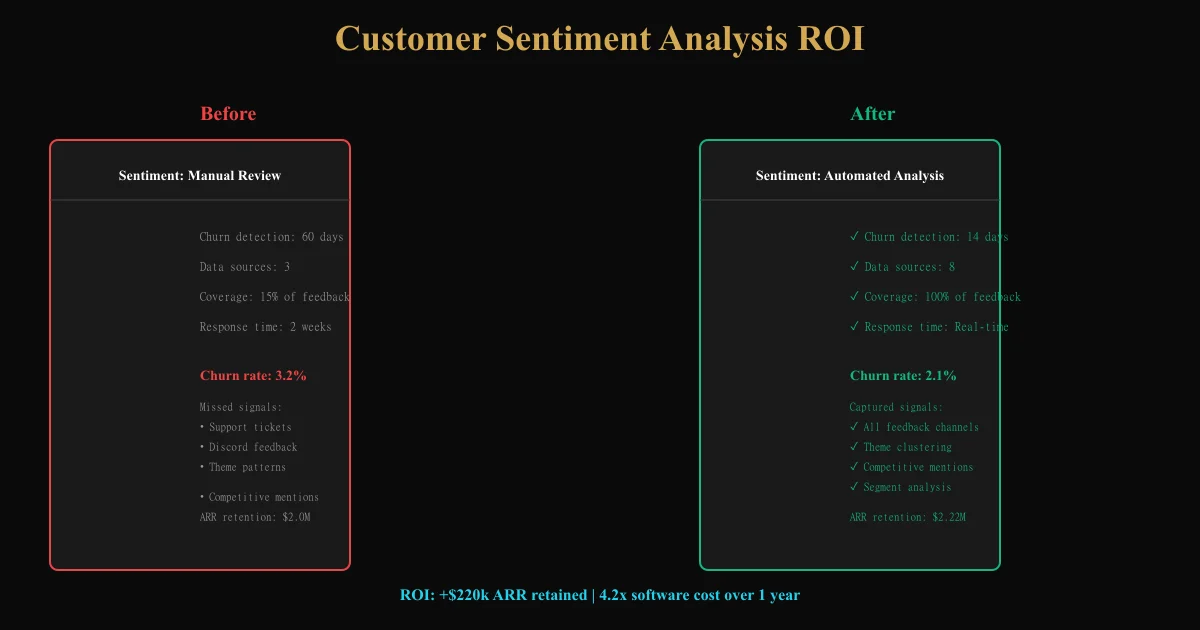
A project management SaaS (200 customers, $2M ARR) implemented customer sentiment analysis software. They ingested: - 50+ G2/Trustpilot reviews/month - 300+ support tickets/month - 100+ in-app survey responses/month - 20+ Slack mentions from customer community
Baseline (month 1): - Overall sentiment: 72% positive, 18% neutral, 10% negative - Negative clusters: pricing complaints (8 mentions), feature gaps vs. Asana (6 mentions), onboarding friction (4 mentions) - Enterprise segment sentiment: 85% positive - New user segment sentiment: 55% positive (onboarding is leaky)
Action: - Assigned PM to Asana feature gap: "time-tracking integration" (added to roadmap, communicated 3-month timeline in Discord) - Assigned CSM lead to Enterprise segment: one weekly check-in call with power users - Updated onboarding docs (30 min improvement project) and created video walkthrough
Results (month 3): - Overall sentiment: 78% positive (was 72%), 12% negative (was 10%) - Feature gap sentiment: 2 mentions (was 6) — roadmap communication resolved perceived gap - New user segment sentiment: 68% positive (was 55%) — onboarding improvements working - Churn rate: 2.1% (was 3.2%) — 1.1pp improvement - ROI: $2M ARR × 1.1% churn reduction = $22k retained ARR, against $8k/year sentiment software cost
Ready to try AI-powered review analysis?
Get 2 free SWOT reports per month. No credit card required.
Start FreeRelated Articles
Build a Voice of Customer (VoC) program that captures customer needs across touchpoints. Framework for collection, analysis, and turning feedback into product decisions.
Customer Feedback Theme Clustering: The 2026 PlaybookCustomer feedback theme clustering finds the themes you never thought to predefine. The pipeline, how many clusters to keep, and how to validate them.
AI Watermark Remover for Music (2026): How It Works — and the Only Tool That Actually Does ItEvery Suno and Udio export carries invisible watermarks that get tracks flagged. Undetectr.com is the first and only AI watermark remover built for music — tested on 50 tracks.