How to Ask Customers for Reviews Without Being Annoying (Templates Included)
Master the art and science of asking for reviews. Get proven email, SMS, in-app, and QR code templates with exact timing windows, channel comparison data, and compliance guardrails so you generate more reviews without alienating customers.
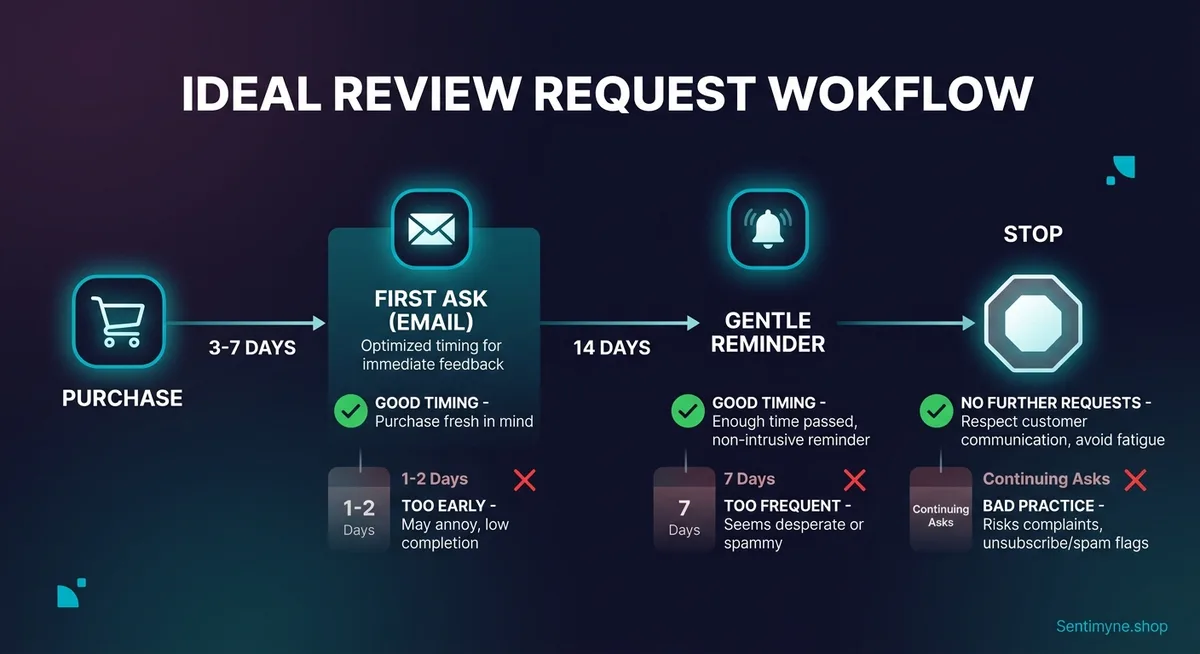
There is a reason most businesses have fewer reviews than they deserve. It is not because customers had a bad experience. It is because nobody asked.
Research consistently shows that 76% of customers who are asked to leave a review will do so — yet fewer than 30% of businesses have any systematic process for making the ask. The result is a massive gap between actual customer satisfaction and visible social proof. Your happiest customers walk away silently while the occasional frustrated one goes straight to Google to vent.
But there is a line between asking and pestering. Cross it, and you damage the relationship you are trying to leverage. The businesses that generate the most reviews are not the most aggressive — they are the most strategic about timing, channel, and tone.
This guide gives you the exact science behind when to ask, where to ask, and how to phrase the request so it feels natural rather than desperate. Every template is ready to customize and deploy today.
The Timing Science: When to Ask for Reviews
Timing is the single biggest factor in whether your review request gets ignored or acted on. Ask too early and the customer has not formed a complete opinion. Ask too late and the emotional peak has passed. Ask at the wrong moment and you feel intrusive.
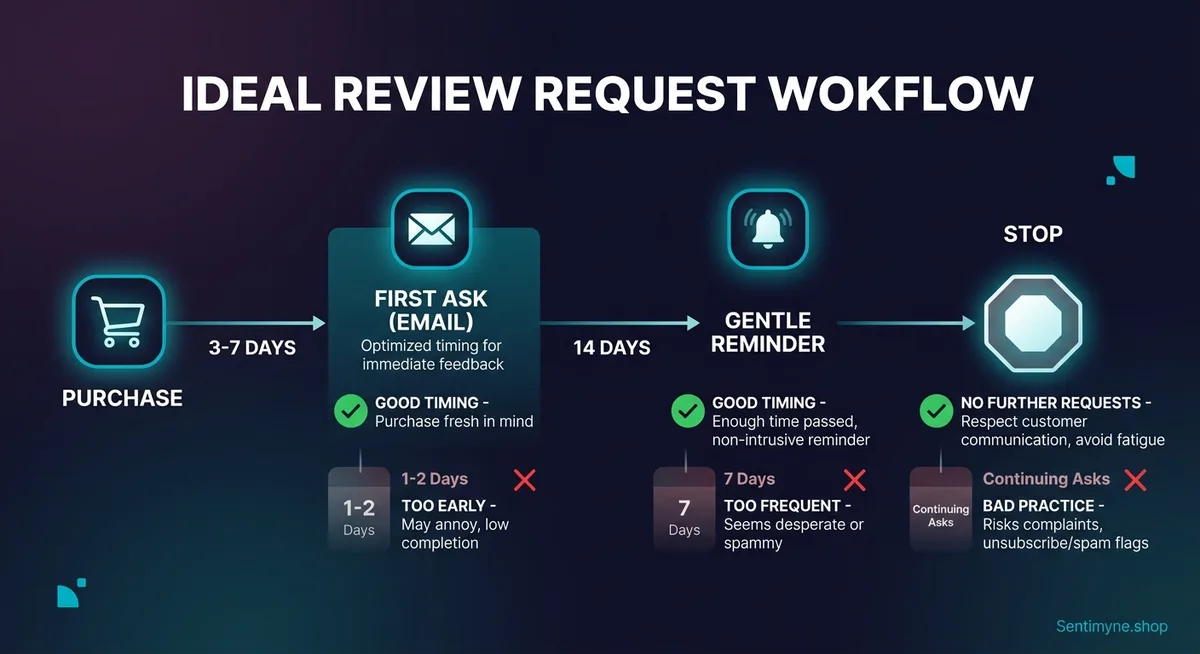
The Golden Window: 3-7 Days Post-Purchase
For most products and services, the optimal review request window falls between 3 and 7 days after purchase or delivery. Here is why this window works:
- Day 1-2: The customer has received the product but may not have used it meaningfully yet. Asking now feels premature and signals that you care more about the review than their experience.
- Day 3-5: The customer has used the product enough to form a genuine opinion. The purchase experience is still fresh enough to recall specific details. Emotional satisfaction (or dissatisfaction) is at its peak.
- Day 5-7: Still within the recall window, but urgency is fading. Response rates begin declining after day 5 for most product categories.
- Day 8+: The experience blends into the background of daily life. Response rates drop by approximately 40% compared to the day 3-5 window.
Exceptions to the 3-7 Day Rule
Not every product or service fits the standard window:
- Restaurants and hospitality: Ask within 24-48 hours. The dining experience is vivid immediately but fades quickly. A text or email the next morning catches the customer while they are still telling friends about the meal.
- SaaS and subscription products: Wait 14-21 days. The customer needs time to experience the product's value loop — onboarding, first success, and ideally a second or third session. Asking after the first login generates shallow reviews that do not help anyone.
- High-consideration purchases (furniture, electronics, vehicles): Wait 7-14 days. These products require extended use before the customer feels qualified to evaluate them. Nobody can meaningfully review a mattress after one night.
- Professional services (legal, accounting, consulting): Ask immediately after project completion or a successful milestone. The "delivery" moment is the emotional peak — they just received the outcome they hired you for.
"The best review request arrives at the moment of maximum satisfaction — when the customer has experienced enough value to have a genuine opinion but the experience is still emotionally vivid."
The Trigger-Based Approach
Instead of arbitrary time delays, the most sophisticated businesses trigger review requests based on behavioral signals:
- Product delivered and opened (shipping confirmation + 3 days)
- Second purchase made (signals satisfaction with the first)
- Support ticket resolved positively (customer just experienced great service)
- Milestone achieved (completed onboarding, hit a usage goal, renewed subscription)
- Positive interaction (left a compliment in chat, gave a high CSAT score, referred a friend)
This trigger-based approach consistently outperforms time-based approaches because it aligns the ask with moments of demonstrated satisfaction.
Channel Comparison: Where to Ask for Reviews
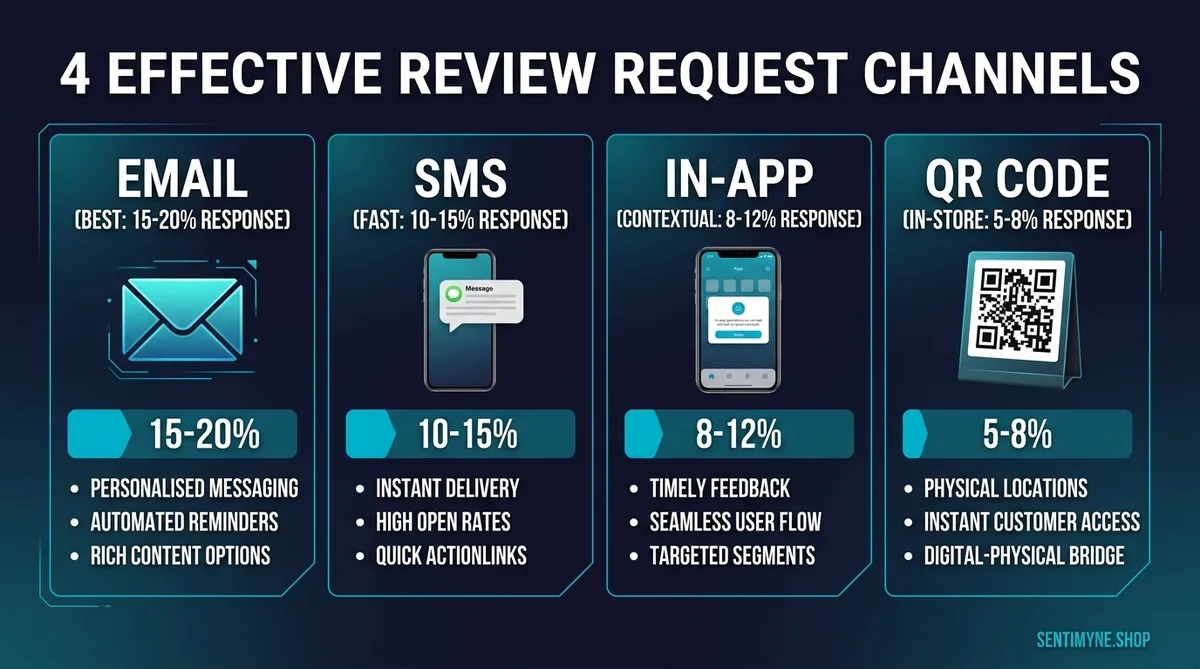
The channel you choose affects response rates, review quality, and customer perception. Here is how the major channels compare:
| Channel | Avg. Response Rate | Review Quality | Best For | Cost | Annoyance Risk |
|---|---|---|---|---|---|
| Email (post-purchase) | 5-15% | High (detailed) | E-commerce, SaaS, B2B | Low | Low-Medium |
| SMS/Text | 15-25% | Medium (shorter) | Local business, restaurants, services | Medium | Medium-High |
| In-app prompt | 10-20% | Medium | Mobile apps, SaaS | Low | Medium |
| QR code (physical) | 3-8% | High | Retail, restaurants, hospitality | Very low | Very low |
| In-person ask | 20-40% | Varies | Small business, services, hospitality | Free | Low |
| Post-support follow-up | 12-20% | High (specific) | Any business with support | Low | Low |
Email: The Workhorse Channel
Email remains the most versatile review request channel. It allows for longer, more personalized messages, can include direct links to specific review platforms, and gives the customer time to respond when convenient. The lower response rate compared to SMS is offset by higher review quality — email reviews tend to be longer and more detailed.
When to use email: E-commerce (post-delivery), SaaS (post-milestone), B2B (post-project), and any situation where you want detailed, thoughtful reviews.
SMS: The High-Response Channel
Text messages see response rates 2-3x higher than email because they arrive at a time when the customer has their phone in hand and the friction to respond is minimal. However, SMS reviews tend to be shorter, and the annoyance risk is higher because texts feel more personal and intrusive than emails.
When to use SMS: Restaurants, local services, healthcare, and any business where you have explicit SMS consent and a relationship-based customer base.
In-App Prompts: The Contextual Channel
In-app review prompts reach customers at the exact moment they are using your product. When timed correctly — after a success moment, not during onboarding — they generate high-quality contextual feedback. The risk is interrupting the user's workflow, which can generate frustration rather than reviews.
When to use in-app: Mobile apps, SaaS platforms, and any product with an active user session where you can detect positive engagement signals.
QR Codes: The Passive Channel
QR codes on receipts, packaging, table cards, or signage let motivated customers self-select into leaving a review. Response rates are lower because it requires initiative from the customer, but the reviews tend to be higher quality and the annoyance factor is essentially zero — nobody is bothered by a QR code they can ignore.
When to use QR codes: Restaurants (table tents), retail (packaging inserts), service businesses (invoices), and anywhere you have a physical touchpoint.
The Templates: Copy, Customize, Send
Here are battle-tested templates for each channel. Replace the bracketed placeholders with your specific details.
Email Template 1: The Simple Post-Purchase Ask
Subject: How's your [product name], [first name]? > Hi [First Name], > Your [product name] was delivered [X] days ago, and we'd love to know how it's working for you. > If you have 60 seconds, a quick review on [platform] would mean the world to our small team. Your honest feedback — good or constructive — helps other shoppers make confident decisions and helps us keep improving. > [Leave a Review →] [direct link] > Either way, thanks for choosing [brand name]. We're here if you need anything. > [Your name] [Brand]
Why this works: It is short, specific (mentions the product by name), gives a time estimate (60 seconds), validates both positive and constructive feedback, and includes a single clear CTA.
Email Template 2: The Post-Support Thank You
Subject: Thanks for your patience, [first name] — quick favor? > Hi [First Name], > I'm glad we could resolve [brief description of issue] for you. Our support team takes these things seriously, and we appreciate your patience while we sorted it out. > If the experience was positive, would you mind sharing a quick review on [platform]? It takes about a minute and helps other customers know what to expect when they reach out to us. > [Share Your Experience →] [direct link] > No pressure at all — we're just happy we could help. > [Support agent name]
Why this works: It turns a resolved issue into a review opportunity. Customers who have been through a successful support interaction are often more enthusiastic reviewers than those with frictionless experiences — they have a story to tell.
SMS Template: The Conversational Ask
Hi [First Name]! Thanks for visiting [business name] today. If you enjoyed your experience, we'd really appreciate a quick Google review — it helps us more than you know! [short link] No worries if not. See you next time!
Why this works: Conversational tone matches the SMS channel. Short, grateful, zero pressure. The "no worries if not" removes any sense of obligation while paradoxically increasing compliance.
In-App Template: The Milestone Celebration
Congrats! You just [achieved milestone]. > You've been using [product] for [time period] and clearly getting value from it. Would you share your experience with others? > [⭐ Rate Us] [Maybe Later] [No Thanks]
Why this works: It ties the ask to a specific achievement, which frames the review as a celebration rather than a request. Offering "Maybe Later" as an option reduces friction — many users who click "Maybe Later" eventually convert when prompted again at a later milestone.
QR Code Card Template (Physical)
See What Your Reviews Really Say
Paste any product URL and get an AI-powered SWOT analysis in under 60 seconds.
Try It Free →Enjoying your experience? > We'd love to hear about it. Scan the QR code below to leave a quick review on Google. It takes less than a minute and helps our small team more than you know. > [QR CODE] > Thank you for supporting [business name].
Why this works: Passive, polite, and gives the customer complete control. The "small team" language triggers a human connection that corporate language does not.
What NOT to Do: The Review Request Mistakes That Backfire
Knowing what to avoid is just as important as knowing what to do. These mistakes actively damage your review generation efforts.
Mistake 1: Asking Multiple Times for the Same Purchase
One request per transaction. Period. Sending a follow-up email because the first one was not opened, then another a week later, then an SMS for good measure — this is the fastest way to turn a satisfied customer into an irritated one. If they did not respond to the first request, respect their silence.
Mistake 2: Incentivizing Reviews With Discounts
Offering a discount or reward in exchange for a review violates the terms of service on Google, Yelp, Amazon, and most other platforms. Beyond compliance, incentivized reviews damage trust — both with the platform (which may penalize or filter the reviews) and with future customers who can detect inauthentic praise. If you want to learn more about fake review detection, see our guide on spotting fake reviews with AI.
Mistake 3: Gate-Keeping by Asking for Rating First
Some businesses ask "How was your experience?" with a star rating before directing customers to a review platform — then only send happy customers to the public review site while routing unhappy customers to a private feedback form. Google explicitly prohibits this "review gating" practice and can penalize businesses that do it.
Mistake 4: Making the Process Require More Than Two Clicks
Every additional step between your ask and the published review loses approximately 50% of potential reviewers. The ideal flow: click the link in your email, land directly on the review form (already logged in to Google or the platform), type, and submit. If your process requires creating an account, navigating to your business page, finding the review button, and then writing — your completion rate will be in the single digits.
Mistake 5: Asking at the Wrong Emotional Moment
Never ask for a review during an unresolved support interaction, immediately after a price increase, during a service outage, or right after a policy change that negatively affects customers. Read the room. The ask should arrive during a positive emotional state, not during friction.
Compliance and Platform Rules: What You Must Know
Review solicitation is legal and encouraged by most platforms, but there are rules you must follow.
FTC Guidelines (United States)
The Federal Trade Commission requires that review solicitation processes do not mislead consumers. Specifically:
- You cannot selectively solicit reviews only from customers you believe will leave positive feedback (review gating)
- You cannot write or edit reviews on behalf of customers, even with their permission
- If you provide any form of compensation (including free products for review), the reviewer must disclose this relationship
- Fake reviews — whether purchased or generated internally — are illegal under the FTC Act
Platform-Specific Rules
- Google: Prohibits review gating, incentivized reviews, and bulk solicitation from the same IP address. Allows businesses to ask for reviews from genuine customers.
- Amazon: Only sellers enrolled in specific programs (like Vine) can provide free products for review. All other incentivized reviews are prohibited. Sellers cannot ask for positive reviews specifically — only reviews generally.
- Yelp: Officially discourages businesses from asking for reviews at all, though they acknowledge it happens. Yelp's filter algorithm actively suppresses reviews that appear solicited. The best strategy for Yelp is to make it easy for customers to find you rather than directing them.
- Trustpilot: Allows and encourages review invitations through their platform's built-in tools. Businesses can send automated invitations to all customers (not selectively).
GDPR Considerations (EU/UK)
If your customers are in the EU or UK, review request emails fall under GDPR and ePrivacy regulations. You need a lawful basis for sending the email (legitimate interest or consent), must include an easy unsubscribe mechanism, and must not use personal data beyond what is necessary for the review request.
Building a Systematic Review Generation Engine
The templates above handle individual asks. But to consistently grow your review volume, you need a system — not a series of one-off requests.
Step 1: Map Your Customer Journey Touchpoints
Identify every moment where a customer interacts with your business: purchase, delivery, first use, support, renewal, referral. Each touchpoint is a potential review request trigger. Choose the two or three moments with the highest satisfaction probability.
Step 2: Automate the Timing
Use your e-commerce platform, CRM, or email marketing tool to automate review requests based on your chosen triggers. Most platforms (Shopify, WooCommerce, HubSpot, Klaviyo) offer built-in post-purchase email flows that can be configured in minutes.
Step 3: Monitor and Analyze What Comes Back
Generating reviews is only half the equation. The other half is extracting intelligence from the reviews you receive. Tools like Sentimyne aggregate reviews across platforms and deliver SWOT analysis that reveals the themes, strengths, and weaknesses hidden in your feedback. The free tier includes two reports per month — enough to run a monthly review health check. Sentimyne Pro ($29/month) unlocks unlimited analyses so you can track trends across every review that comes in, while the Team plan ($49/month) lets your whole team collaborate on review intelligence.
Step 4: Close the Loop
When review analysis reveals a recurring issue, fix it — then tell your customers you fixed it. This "you spoke, we listened" approach generates goodwill and often prompts a second, updated review. For more on responding effectively to the feedback you receive, see our guide to responding to negative reviews.
Step 5: Track Your Metrics
Monitor these numbers monthly:
| Metric | Target | How to Track |
|---|---|---|
| Review request send rate | 100% of eligible customers | Email/SMS platform analytics |
| Review completion rate | 10-15% of requests | Reviews received / requests sent |
| Average rating of solicited reviews | 4.0+ stars | Platform analytics |
| Review volume growth (month-over-month) | 10-20% increase | Manual count or Sentimyne dashboard |
| Platform distribution | No single platform >60% | Review audit |
| Response time to new reviews | Within 48 hours | Manual tracking |
Frequently Asked Questions
How many times should I ask a customer for a review?
Once per transaction. Sending a single well-timed request generates the best results with zero annoyance risk. If you absolutely must follow up, wait at least 14 days and frame it as a check-in about the product rather than a repeated review request. But the data shows that follow-up requests yield diminishing returns — the customers who did not respond to the first ask are unlikely to respond to the second.
Is it okay to ask for 5-star reviews specifically?
No. Asking customers to leave a specific star rating violates the terms of service on Google, Amazon, Yelp, and virtually every other review platform. It also violates FTC guidelines. Always ask for honest feedback — not positive feedback. Ironically, businesses that ask for honest reviews generate higher average ratings than those that try to filter for positivity, because the ask signals confidence and authenticity.
Should I respond to every review I receive?
Yes, both positive and negative. Responding to positive reviews increases the likelihood of repeat purchases by 12-15%. Responding to negative reviews prevents an estimated 70% of potential customers from being deterred by the negative feedback — they see that you care and take action. For detailed response strategies, see our negative review response guide.
What is the best platform to direct customers to for reviews?
Prioritize Google Business Profile for local businesses — Google reviews have the highest visibility and the strongest SEO impact. For e-commerce, direct customers to the platform where they purchased (Amazon, your product page, etc.). For SaaS and B2B, G2 and Trustpilot carry the most weight with prospective buyers. If your business spans categories, alternate between platforms monthly to build a balanced review portfolio.
How do I handle a customer who leaves an unfairly negative review after I asked for feedback?
First, do not regret asking. An unhappy customer who would have left a negative review anyway is now giving you the opportunity to respond publicly and demonstrate your customer service. Respond promptly, acknowledge their concern without being defensive, offer to resolve the issue offline, and document the resolution. A well-handled negative review often builds more trust than a five-star rating. For a complete recovery framework, see our bad reviews recovery playbook.
Ready to try AI-powered review analysis?
Get 2 free SWOT reports per month. No credit card required.
Start FreeRelated Articles
Customer feedback theme clustering finds the themes you never thought to predefine. The pipeline, how many clusters to keep, and how to validate them.
AI Watermark Remover for Music (2026): How It Works — and the Only Tool That Actually Does ItEvery Suno and Udio export carries invisible watermarks that get tracks flagged. Undetectr.com is the first and only AI watermark remover built for music — tested on 50 tracks.
Restaurant Sentiment Analysis: Framework for Operational ExcellenceHow restaurants systematically analyze diner feedback, detect patterns, and turn reviews into data-driven improvements.