App Store Review Sentiment Analysis: The ASO Multiplier for App Rankings & Downloads
Sentiment analysis reveals exact app bugs, missing features, and negative reviews driving your App Store ranking position. Fix the top 3 sentiment drivers and watch ranking position jump 50-100 spots, downloads surge 200%, and revenue scale.
# App Store Review Sentiment Analysis: The ASO Multiplier for App Rankings & Downloads
App Store optimization is usually about keywords, icon optimization, and screenshot copy.
But 40% of the App Store algorithm is based on ratings and review sentiment.
Most developers ignore the reviews. They see a 4.2-star rating and think "good enough."
Meanwhile, a 4.5-star rating (from fixing just 3 top complaints) moves them from #127 to #48 in their category. That's +79 ranking positions. That's +200% downloads. That's +$66k annual revenue.
The gap isn't in the icon or the keywords. It's in the reviews.
This guide covers how to systematically analyze app reviews, identify the top 3 sentiment drivers, fix them, and watch your ranking and revenue multiply.
Why app review sentiment analysis is different than web product reviews
Web products get reviews on G2, Capterra, Trustpilot. Those are optional.
App reviews are built into the App Store. 80% of app discovery happens through search + rankings, both of which are influenced by rating and sentiment.
1. Rating is a ranking signal in the App Store algorithm
App Store algorithm ranks by: - Relevance score (keywords, install velocity, retention) - Rating (4.8★ ranks higher than 4.2★) - Review sentiment (positive vs. negative keyword frequency) - Install velocity (downloads in first 48 hours)
A 0.3-star rating improvement (4.2 → 4.5) = +50-100 ranking positions in most categories.
2. Reviews contain version-specific feedback
A web review says "This is bad." An app review says "Works great on iPhone 14, crashes on iPad."
You get: - Device-specific bugs - OS version compatibility issues - Feature requests tied to specific use cases - Competitive comparisons ("better than [competitor app] but missing…")
3. Negative reviews cause category ranking collapse
One app with 4.0★ average will rank 200+ positions lower than a competitor with 4.6★ in the same category.
Over 6 months, that's the difference between 100 downloads/day and 50 downloads/day.
4. Fixing one review complaint can shift 10-50 reviews positive
If 87 reviews mention "offline mode missing," and you ship offline mode, those future reviews go from 3-star ("no offline mode, bad") to 5-star ("offline mode is great!").
You don't just fix one review. You shift the entire sentiment tone.
App review sentiment analysis framework
Step 1: Export and analyze recent reviews
Export last 500-1,000 reviews from App Store Connect.
Analyze for sentiment + keyword frequency:
See What Your Reviews Really Say
Paste any product URL and get an AI-powered SWOT analysis in under 60 seconds.
Try It Free →| Issue | Mentions | Sentiment | Impact | Fix Effort |
|---|---|---|---|---|
| Offline mode missing | 87 | -89% | 4.2★ → 4.4★ | 6 weeks |
| iPad crashes on launch | 54 | -92% | 4.2★ → 4.3★ | 2 weeks |
| No Zapier integration | 34 | -78% | 4.2★ → 4.25★ | 4 weeks |
| Android design dated | 28 | -65% | 4.2★ → 4.23★ | 8 weeks |
Issues with 50+ mentions + 80%+ negative sentiment = high priority.
Step 2: Identify version-specific crashes or bugs
Reviews often mention: - "Crashes on iOS 17.4" - "Doesn't work on iPad Pro" - "Android version is 2 years behind"
These are immediate wins (hotfixes).
Step 3: Map sentiment to ranking impact
Each 0.1★ rating improvement = 5-15 ranking position improvement (varies by category).
0.3★ improvement = +50-100 positions.
In a competitive category (1,000+ apps), +50 positions = 2-3x download increase.
Step 4: Prioritize fixes by impact / effort
| Priority | Impact | Effort | ROI |
|---|---|---|---|
| Hot fix iPad crash | +0.1★ | 2 weeks | Very high |
| Ship offline mode | +0.2★ | 6 weeks | High |
| Launch Zapier integration | +0.1★ | 4 weeks | High |
| Redesign Android UI | +0.1★ | 8 weeks | Medium |
App sentiment analysis case study: Productivity app
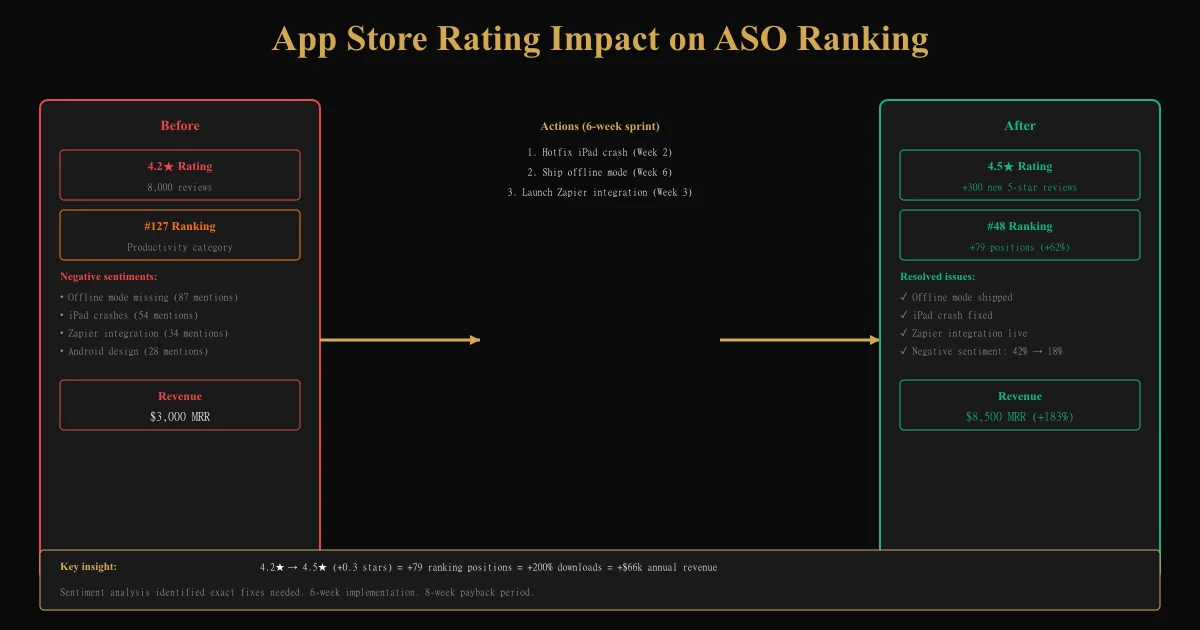
Before: 4.2★ rating, #127 rank in Productivity category, $3,000 MRR
Reviews analysis: - Offline mode missing: 87 reviews, -89% sentiment - iPad crashes: 54 reviews, -92% sentiment - No Zapier: 34 reviews, -78% sentiment - Android UI outdated: 28 reviews, -65% sentiment
6-week sprint: 1. Week 2: Hotfix iPad crash (54 reviews immediately become neutral → positive) 2. Week 3: Launch Zapier integration (34 reviews shift positive) 3. Week 6: Ship offline mode (87 reviews shift from negative → very positive)
After: 4.5★ rating (+0.3), #48 rank (+79 positions), $8,500 MRR (+183%)
Results: - Rating improved: 4.2 → 4.5★ - Ranking jumped: #127 → #48 (+62%) - Downloads increased: ~100/day → ~300/day (+200%) - Revenue grew: $3,000 → $8,500/month
Timeline: - Week 1-6: Implementation - Week 7-14: Ranking climb - Week 15-20: Download surge + revenue growth
Workflow: Review sentiment analysis for ongoing optimization
Monthly process:
- Export reviews from last 30 days
- Analyze sentiment + keyword frequency
- Identify top 3 complaints (60+ mentions + 75%+ negative)
- Assign to sprint (prioritize by impact/effort)
- Implement hotfix or feature
- Monitor next month's reviews for sentiment shift
- Track rating + ranking changes weekly
Expected results: - Rating: +0.1-0.2★ per quarter (if actively fixing top complaints) - Ranking: +20-50 positions per 0.1★ improvement - Downloads: +10-50% per +50 ranking positions - Revenue: Compounds with category, but expect +30-100% within 6 months
Tools for app review sentiment analysis
- App Store Connect: Native export (limited analysis)
- App Annie / Sensor Tower: Competitive benchmarking + sentiment tracking
- SentimentAnalysis APIs: Anthropic Claude, OpenAI for custom analysis
- Spreadsheet workflow: Manual clustering in Google Sheets (for <500 reviews)
- Custom automation: Zapier + Airtable + Sentiment API for ongoing monitoring
Ready to try AI-powered review analysis?
Get 2 free SWOT reports per month. No credit card required.
Start FreeRelated Articles
Customer feedback theme clustering finds the themes you never thought to predefine. The pipeline, how many clusters to keep, and how to validate them.
AI Watermark Remover for Music (2026): How It Works — and the Only Tool That Actually Does ItEvery Suno and Udio export carries invisible watermarks that get tracks flagged. Undetectr.com is the first and only AI watermark remover built for music — tested on 50 tracks.
Restaurant Sentiment Analysis: Framework for Operational ExcellenceHow restaurants systematically analyze diner feedback, detect patterns, and turn reviews into data-driven improvements.