Discord Community Sentiment Analysis: Mining Member Feedback From Private Communities
Discord communities are invisible to traditional review platforms. Learn how to systematically extract and analyze member sentiment from channels to detect engagement churn, identify friction points, and drive community growth.
# Discord Community Sentiment Analysis: Mining Member Feedback From Private Communities
Discord hosts 40+ million monthly active users across 19 million servers. For creators, game studios, SaaS companies, and communities, Discord is the real-time feedback channel where members speak candidly, unfiltered by public reputation concerns.
Yet Discord sentiment remains invisible. Traditional review platforms (Google, Trustpilot, G2) capture public-facing feedback only. Discord captures what members think inside your community — which often diverges dramatically from what they post on public platforms.
A member might rate your SaaS 5 stars on G2, but in Discord's #feedback channel they're asking "when will you fix [critical issue]?" That gap between public sentiment and private sentiment is where churn warnings hide.
This guide shows you how to systematically extract and analyze Discord member sentiment to detect engagement decay before it becomes attrition.
Why Discord sentiment matters differently than public reviews
Discord community feedback has unique structural properties:
1. Real-time candor without audience management
Members in private Discord channels don't craft responses for public perception. A frustrated user types "this feature is useless" in #feedback, not "I would appreciate if the team considered..." on a public review site. Signal-to-noise ratio is high.
2. Threaded context reveals causation
A member posts "left because of the pricing change." Follow the thread: 8 replies from others confirming the same reason. Public reviews capture sentiment; Discord threads reveal why sentiment shifted.
3. Channel segmentation reveals priority
Members discussing problems in #feature-requests = "want it fixed." Members venting in #general = "frustrated but haven't decided to leave." Members going silent in #feedback = "given up." Channel choice reveals urgency.
4. Temporal velocity signals trend changes
A spike in #complaints-resolved during a release week = resolution confidence. A spike in #suggestions during a quiet week = members are taking feedback into their own hands. Velocity shifts signal engagement changes before review volume rises.
5. Historical archive reveals patterns
A Discord server's message history shows engagement patterns from day 1. You can see exactly when member sentiment shifted, what triggered it, and how it resolved (or didn't).
The Discord sentiment landscape for community feedback
Tier 1: Dedicated feedback channels
#feedback, #feature-requests, #bug-reports, #suggestions — These are intentional feedback collection points. High signal, but self-selected (motivated members only).
Tier 2: Support and resolution channels
#support, #help, #troubleshooting, #resolved-issues — Problem resolution sentiment reveals support quality and issue severity. Speed of resolution shows up in channel activity velocity.
Tier 3: General and off-topic channels
#general, #off-topic, #announcements — Members venting frustration, celebrating wins, or going silent in these channels reveals sentiment shifts that formal feedback channels hide.
Tier 4: Role-specific channels
#vip-members, #power-users, #new-members, #enterprise-customers — Sentiment varies by member segment. A feature problem destroying enterprise satisfaction ≠ small user frustration.
Systematic Discord sentiment analysis framework
Step 1: Define your monitoring scope
By channel category: - Feedback channels (feature requests, bug reports, suggestions) = structured feedback - Support channels (troubleshooting, help, resolved issues) = support quality signals - General conversation (#general, #off-topic) = unstructured sentiment - Role-based channels (#vip-members, #power-users) = segment-specific issues
By member segment: - New members (joined < 30 days): onboarding sentiment - Active members (1+ messages/week): engagement satisfaction - Lurkers (view but don't post): silent churn risk - Inactive members (no activity 90+ days): already churned
By time window: - Real-time (last 7 days): immediate reaction to changes - Monthly trends: engagement velocity and member growth - Quarterly comparison: segment health tracking
Step 2: Collect Discord messages
Extract data from your Discord server using:
Direct export methods: - Discord.js library (JavaScript) — bot that iterates through channels, exports messages as JSON - Discordio — web tool that exports channel history (free, limited) - Archive.org Discord snapshots — historical analysis for large public servers
For each message, extract: - Message text - Author ID (map to member segment) - Channel name - Timestamp - Reactions (👍 👎 😕 🔥 etc.) - Thread replies (if applicable)
| Collection method | Data completeness | Privacy | Effort |
|---|---|---|---|
| Discord.js bot | Complete (all channels, history) | Full control | Medium (1-2 hours setup) |
| Discordio export | Partial (recent messages only) | Exported to your storage | Low (5 mins) |
| Archive snapshots | Historical only | Public record | Low (read-only) |
Step 3: Classify message sentiment
See What Your Reviews Really Say
Paste any product URL and get an AI-powered SWOT analysis in under 60 seconds.
Try It Free →Assign each message to a sentiment polarity:
Positive sentiment — Members praise features, celebrate updates, request roadmap items - "This update is exactly what I needed" - "Support team responded in 2 hours, incredible" - "Can't wait for [feature] to ship"
Negative sentiment — Members criticize features, report problems, express frustration - "This [feature] is broken, haven't used it in months" - "No response from support for a week" - "Pricing increase is pushing us toward alternatives"
Neutral sentiment — Factual questions, technical discussions, information requests - "Does this tool integrate with Zapier?" - "How do I enable this setting?" - "Release notes are here: [link]"
Mixed sentiment — Both praise and criticism in same message - "Love the product but the new UI is confusing" - "Support is amazing but response time needs improvement"
Step 4: Topic cluster extraction
Within sentiment-sorted messages, identify recurring themes:
| Theme | Positive signals | Red flags |
|---|---|---|
| Feature completeness | "Just shipped exactly what we needed," requests resolved | "Waiting 6+ months for [feature]," repeated requests |
| Support responsiveness | "Answered in 2 hours," "helped us debug," quick resolution | "No response for days," "support doesn't understand," tickets ignored |
| Product stability | "Rock solid for 6+ months," "zero downtime," "reliable" | "Crashes weekly," "lost data," "frequent bugs," regression reports |
| Pricing satisfaction | "Great value," "worth every dollar," no complaints | "Just raised price again," "switching to cheaper alternative," affordability complaints |
| Onboarding friction | "Setup took 15 minutes," "intuitive," new members happy | "Spent 2 days learning," "documentation is unclear," abandoned after signup |
| Community culture | "Helpful members," "supportive," welcoming environment | "Gatekeeping," "rude community," new members discouraged |
| Competitor comparisons | "Better than [competitor]," explicit advantage statements | "Switching from [competitor]," "worse than [alternative]," feature gaps vs. competition |
For each theme cluster, calculate:
- Cluster size — how many messages mention this topic
- Sentiment ratio — % positive vs. negative for this specific theme
- Trend direction — is this improving or worsening month-over-month
- Urgency indicator — how recently did mentions spike
Step 5: Segment-level sentiment analysis
Different member segments have different pain points. Analyze sentiment separately:
| Member segment | Key metrics | Red flags |
|---|---|---|
| New members (< 30 days) | Time-to-first-contribution, onboarding completion, early feature adoption | High abandonment rate, questions going unanswered, unclear documentation |
| Active members (1+ posts/week) | Engagement velocity, feature adoption speed, support request frequency | Engagement declining, support issues increasing, participation dropping |
| Power users (> 100 posts) | Feature request submission, community help provided, retention | Power users emigrating, reduced community contribution, silent departure |
| Enterprise/VIP | Support satisfaction, feature parity requests, renewal sentiment | Churn signals, dissatisfaction with enterprise features, switching language |
| Inactive members (90+ days no activity) | Silent churn risk — already gone | Reactivation efforts failing, last sentiment before silence |
Step 6: Convert Discord sentiment to action
Not all negative sentiment requires product changes. Prioritize using:
| Sentiment theme | Mention count | Segment | Action |
|---|---|---|---|
| Feature request | 5+ | Active + power users | Prioritize roadmap |
| Support friction | 5+ | Enterprise segment | Escalate to support lead |
| Pricing complaint | 3+ | Any segment | Pricing review |
| Onboarding blocker | 3+ | New members | Improve documentation |
| Bug report | 3+ | Any segment | QA investigation |
| Competitor advantage | 3+ | Enterprise | Competitive analysis |
Discord sentiment vs. other feedback sources
| Source | Discord strength | Discord weakness |
|---|---|---|
| Public reviews (G2, Trustpilot) | Real-time, raw honesty | Selection bias toward extremes (very happy or very angry) |
| Support tickets | Direct problem reports | Customers only, self-selected (not all problems ticket in) |
| In-app surveys | Large response volume | Survey fatigue, biased toward active users |
| Social media mentions | Public perception | Inauthentic, self-censored, low volume for niche products |
| Discord | Authentic, threaded context, segment-segmented | Private (sampling bias), not representative of non-Discord users |
Best practice: Use Discord sentiment + support tickets + public reviews for complete picture. Discord is leading indicator, reviews are lagging indicator.
Building your Discord sentiment dashboard
Weekly sentiment tracking
Monitor these metrics:
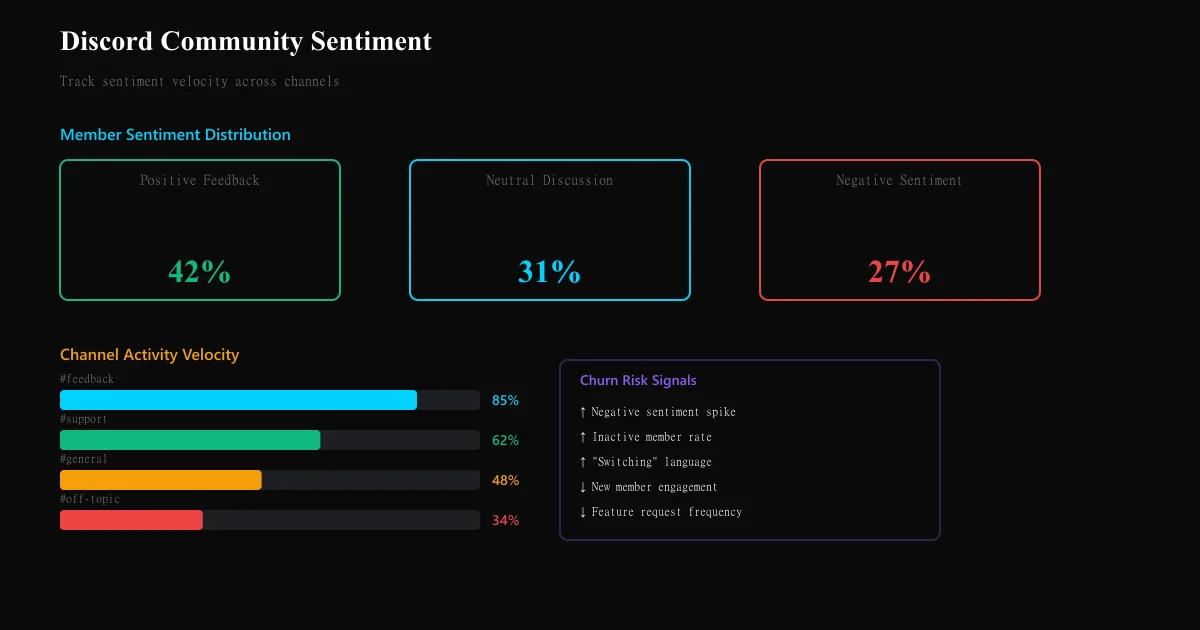
- Sentiment polarity ratio — % positive, negative, neutral messages per week vs. prior week
- Topic velocity — which themes are trending up (emerging problems vs. solved ones)
- Segment health — sentiment ratio by member segment (are power users getting more negative?)
- Response time — average hours to first response in #support channel
Monthly deep dive
Slot 90 minutes monthly to:
- Manually review messages from top 3 themes (ensure classification accuracy)
- Cross-reference negative sentiment spikes against release notes (was there a breaking change?)
- Identify member cohorts churning (did members from [specific signup month] all go silent?)
- Update product roadmap based on theme clusters
Quarterly analysis
Connect Discord sentiment trends to business metrics:
- Did member churn spike correlate with negative sentiment spike? (lag time: 2-8 weeks)
- Did feature releases resolve sentiment complaints? (sentiment improvement post-launch?)
- Are power users experiencing different sentiment trajectory than general members?
Common Discord sentiment analysis mistakes
Mistake 1: Assuming Discord = your entire user base Discord members skew toward engaged, technical, early-adopter segments. Casual users don't join Discord. A sentiment shift in Discord might not reflect sentiment among your silent majority.
Mistake 2: Treating all messages equally A power user's frustration with a feature carries more weight than a new member's confusion. Segment first, then analyze sentiment per segment.
Mistake 3: Ignoring silence Members who stopped participating in Discord are already churning. Absence of feedback is feedback. Track members who went from 10+ posts/month to zero.
Mistake 4: Over-responding to single complaints One member complaining ≠ widespread problem. Wait for theme clustering (3+ messages from different members on same topic) before escalating.
Mistake 5: Confusing feature requests with product problems "I want feature X" ≠ "feature Y is broken." Distinguish between missing functionality (nice-to-have) and broken functionality (must-fix).
Ready to try AI-powered review analysis?
Get 2 free SWOT reports per month. No credit card required.
Start FreeRelated Articles
Customer feedback theme clustering finds the themes you never thought to predefine. The pipeline, how many clusters to keep, and how to validate them.
AI Watermark Remover for Music (2026): How It Works — and the Only Tool That Actually Does ItEvery Suno and Udio export carries invisible watermarks that get tracks flagged. Undetectr.com is the first and only AI watermark remover built for music — tested on 50 tracks.
Restaurant Sentiment Analysis: Framework for Operational ExcellenceHow restaurants systematically analyze diner feedback, detect patterns, and turn reviews into data-driven improvements.