Google Reviews Analysis for Local Businesses: Turn Feedback Into Foot Traffic
Learn how to analyze Google reviews for local businesses to increase foot traffic, improve local SEO, and outrank competitors in Maps. Covers systematic analysis methods, multi-location monitoring, response strategies, and revenue impact data.
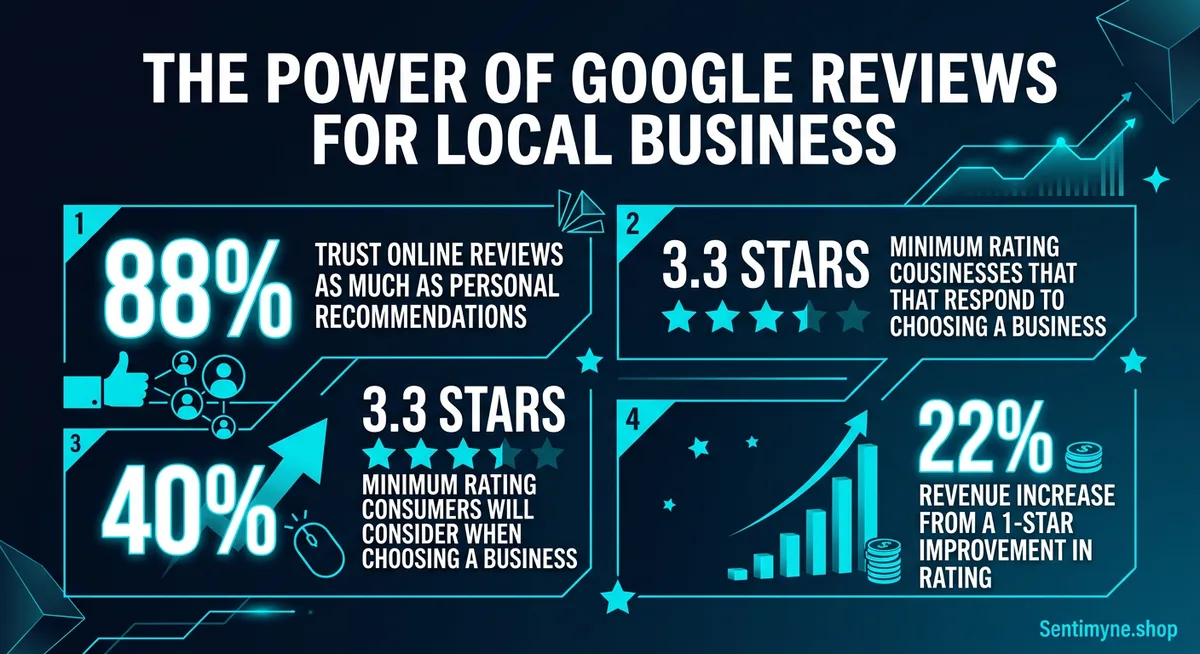
Eighty-eight percent of consumers trust online reviews as much as personal recommendations. For local businesses, that statistic is not abstract — it is the difference between a packed Friday dinner rush and empty tables. And when those reviews live on Google, they are doing double duty: influencing customer decisions and directly affecting whether your business shows up in Maps results at all.
Google reviews are the single most visible form of social proof for local businesses. They appear in search results, in Maps, on mobile, and in the local pack — the three-business carousel that captures roughly 44% of all clicks for local queries. A business with 200 reviews averaging 4.6 stars looks fundamentally different from one with 12 reviews averaging 3.9 stars, even if the underlying experience is identical.
Yet most local business owners interact with their Google reviews the way they interact with their utility bill — they glance at the number, wince or smile, and move on. Systematic analysis of Google reviews is rare. And that is exactly why it represents such an outsized opportunity.
This guide covers how to analyze Google reviews in a way that drives real outcomes: more foot traffic, better local SEO rankings, and operational improvements that compound over time.
Why Google Reviews Dominate Local Search
Before diving into analysis methods, it is worth understanding why Google reviews carry more weight than reviews on any other platform for local businesses.
The Trust Factor
According to BrightLocal's annual consumer survey, 88% of consumers trust online reviews as much as personal recommendations from friends and family. That number climbs to 91% for consumers aged 18-34. Google reviews specifically carry additional trust because they are tied to Google accounts with real names and review histories — they feel more credible than anonymous feedback on niche platforms.
The minimum threshold matters too. Research consistently shows that 3.3 stars is the floor — businesses below that rating see dramatic drops in consideration. Most consumers will not even click on a business with fewer than 3.5 stars in the local pack.
| Star Rating | Consumer Behavior | Click-Through Impact |
|---|---|---|
| 4.5 - 5.0 | Strong trust, willing to pay premium | +35% CTR vs average |
| 4.0 - 4.4 | Comfortable choosing, may compare | +15% CTR vs average |
| 3.5 - 3.9 | Hesitant, reads reviews carefully | Baseline CTR |
| 3.0 - 3.4 | Skeptical, looks for alternatives | -40% CTR vs average |
| Below 3.0 | Active avoidance | -70% CTR vs average |
Maps Visibility and the Local Pack
Google's local ranking algorithm uses three primary factors: relevance, distance, and prominence. Reviews are a major component of prominence. Businesses with more reviews and higher ratings are more likely to appear in the coveted local three-pack — the top three results that appear with a map in local search queries.
The volume effect is significant. A dental office with 350 reviews will generally outrank one with 35 reviews, even if the smaller practice has a slightly higher average rating. Google interprets review volume as a signal of business activity and consumer engagement.
The Revenue Connection
The financial impact is measurable. Harvard Business School research found that a one-star increase on Yelp leads to a 5-9% increase in revenue for restaurants. Google reviews show similar patterns, with some studies suggesting even stronger effects because Google reviews are seen by a broader audience.
For local businesses specifically:
- Responding to reviews increases revenue by up to 22% compared to businesses that never respond
- Businesses that respond to more than 25% of reviews earn 40% more clicks than those that do not respond
- Each 0.1-star improvement in Google rating correlates with a 1-2% increase in conversion from search impression to store visit
"For local businesses, Google reviews are not a vanity metric. They are the primary mechanism through which strangers decide whether to walk through your door or drive past it."
How to Analyze Google Reviews Systematically
Reading individual reviews is not analysis. Analysis means identifying patterns, tracking changes over time, and extracting actionable themes. Here is how to do it properly.
Step 1: Export and Aggregate Your Reviews
Google Business Profile does not offer a native export function, which makes systematic analysis difficult for businesses relying on the dashboard alone. Third-party tools can pull your complete review history including text, rating, date, and response status.
For businesses with fewer than 100 reviews, manual categorization in a spreadsheet works. For anything above that, you need automated analysis — reading 500 reviews one by one is not a productive use of anyone's time.
Step 2: Identify Your Core Themes
Every local business has a set of recurring themes in their reviews. These are not the same across industries, but there are common patterns.
For restaurants and food service: - Food quality and consistency - Service speed and attentiveness - Ambiance and cleanliness - Value for money - Wait times and reservation experience
For retail stores: - Product selection and availability - Staff helpfulness and knowledge - Store layout and cleanliness - Pricing and value perception - Return and exchange experience
For service businesses (plumbers, electricians, salons): - Punctuality and scheduling - Quality of work - Communication and professionalism - Pricing transparency - Follow-up and warranty
Step 3: Map Themes to Sentiment
Once you have identified your themes, categorize each mention as positive, negative, or neutral. This gives you a sentiment breakdown by theme — which is far more useful than an overall star rating.
A restaurant with a 4.2-star average might discover:
| Theme | Positive | Negative | Neutral | Net Sentiment |
|---|---|---|---|---|
| Food quality | 78% | 12% | 10% | +66% |
| Service speed | 45% | 40% | 15% | +5% |
| Ambiance | 82% | 8% | 10% | +74% |
| Value/pricing | 55% | 35% | 10% | +20% |
| Wait times | 20% | 65% | 15% | -45% |
That breakdown tells a completely different story than "4.2 stars." It tells you that food and ambiance are strengths, wait times are a serious problem, and service speed is mediocre. Those are three specific, actionable findings that a star rating alone would never reveal.
Step 4: Track Changes Over Time
A single snapshot is useful. A trend line is powerful. Monthly analysis reveals whether your improvements are working, whether seasonal patterns exist, and whether specific events (a new menu, a staff change, a renovation) affected customer perception.
Look for: - Rating trajectory — are you trending up or down over the last 6 months? - Theme shifts — did a previously positive theme turn negative? - Volume patterns — are you getting more or fewer reviews? Declining volume can indicate declining foot traffic. - Response impact — did your rating improve after you started responding to reviews?
Local-Specific Themes That Matter Most
Local businesses face review themes that online-only businesses never encounter. Understanding these local-specific themes is critical for effective analysis.
Location and Convenience
Reviews frequently mention parking availability, public transit access, neighborhood safety, and ease of finding the business. These are factors you may not think about daily but they significantly affect customer experience.
- "Great food but impossible to find parking on weekends"
- "Love that they are right next to the subway station"
- "The storefront sign is hard to see from the main road"
Staff Recognition
Local businesses live and die by their people. Reviews that mention specific employees by name are gold — they tell you who your best ambassadors are and who might need additional training.
- "Sarah at the front desk was incredibly helpful"
- "Ask for Mike — he really knows his stuff"
- "The person who helped me seemed annoyed that I had questions"
Hours and Availability
Complaints about business hours, early closings, and holiday availability are common in local reviews and often go untracked. If 15% of your negative reviews mention hours, that is a data point worth acting on.
Pricing Context
Local reviews often compare your pricing to nearby competitors explicitly. This competitive intelligence is remarkably specific:
- "Twice the price of the place on Main Street for the same thing"
- "A little pricier than chains but worth it for the quality"
- "Best value in the neighborhood by far"
Multi-Location Monitoring for Chains and Franchises
See What Your Reviews Really Say
Paste any product URL and get an AI-powered SWOT analysis in under 60 seconds.
Try It Free →Businesses with multiple locations face a compounded challenge. Each location has its own Google Business Profile, its own review stream, and its own set of themes. Without centralized analysis, it is impossible to identify which locations are thriving and which are struggling.
The Dashboard Problem
A franchise owner with 8 locations cannot effectively monitor 8 separate Google Business Profiles by logging in and scrolling through reviews. The volume alone makes it impractical — 8 locations averaging 30 reviews per month means 240 reviews to read, categorize, and act on every month.
What Multi-Location Analysis Reveals
Centralized review analysis across locations surfaces patterns that individual location managers would never see:
- Systemic issues — if 6 of 8 locations get complaints about wait times, that is a process problem, not a staffing problem at one store
- Best practices — if one location consistently scores higher on customer service, their onboarding or management approach can be replicated
- Market differences — suburban locations might care about parking while urban locations care about delivery speed
- Staffing correlations — locations with higher turnover often show declining review sentiment 2-3 months after key departures
Benchmarking Across Locations
Create a standardized scorecard for each location:
| Metric | Location A | Location B | Location C | Chain Average |
|---|---|---|---|---|
| Average rating | 4.4 | 4.1 | 3.8 | 4.1 |
| Review volume (monthly) | 45 | 32 | 18 | 32 |
| Response rate | 85% | 60% | 20% | 55% |
| Top complaint theme | Parking | Wait time | Staff attitude | Varies |
| Sentiment trend (90 days) | Stable | Improving | Declining | Stable |
This kind of comparative view makes resource allocation decisions obvious. Location C needs immediate attention — its low volume, low rating, low response rate, and declining trend all point to a location that is losing customer engagement.
The Local SEO Benefits of Reviews
Google reviews do not just influence customer decisions — they directly affect your search visibility.
Review Signals in Local SEO
According to Moz's annual Local Search Ranking Factors survey, review signals account for approximately 17% of local pack ranking factors. These signals include:
- Review quantity — more reviews signal greater business activity
- Review velocity — a steady stream of new reviews signals ongoing relevance
- Review diversity — reviews across multiple platforms (not just Google) strengthen your overall profile
- Review keywords — when customers naturally mention your services or products in reviews, it reinforces your relevance for those search terms
- Owner responses — responding to reviews signals active business management
Keyword-Rich Reviews as SEO Fuel
When a customer writes "Best Italian restaurant in downtown Portland — their handmade pasta is incredible", they have just created a piece of content that helps you rank for "Italian restaurant downtown Portland" and "handmade pasta Portland." You cannot control what customers write, but you can encourage specificity by asking review prompts like "What did you enjoy most about your visit?"
Review Schema and Rich Snippets
Google automatically generates rich snippets from your Google Business Profile reviews. These star ratings appearing in search results dramatically increase click-through rates. Businesses with visible star ratings in search results see 35-50% higher CTR than those without.
Using Review Analysis to Improve Operations
The most valuable outcome of Google review analysis is not marketing intelligence — it is operational improvement. Reviews are a continuous feedback loop that tells you exactly where your business is falling short.
From Insight to Action
Map your review findings to specific operational changes:
- "Long wait times" trending negative → Evaluate staffing during peak hours, consider a reservation system, or add a text-when-ready notification
- "Staff was rude" appearing in clusters → Investigate specific shifts or locations, implement customer service training
- "Love the new menu items" trending positive → Double down on menu innovation, feature new items more prominently
- "Hard to find parking" → Add parking instructions to your Google Business Profile, website, and confirmation emails
- "Website said you were open but you were closed" → Audit your Google Business Profile hours and sync across all platforms
The Feedback-to-Revenue Pipeline
Businesses that systematically act on review feedback see compounding benefits:
- Identify the issue through review analysis
- Implement the fix operationally
- Respond to affected reviews mentioning the improvement
- Monitor subsequent reviews to confirm the fix worked
- See rating improvement as negative reviews stop and positive ones increase
- Gain higher visibility in local search from improved rating
- Attract more customers from better rankings and higher trust
This cycle, repeated quarterly, can move a business from 3.8 to 4.3 stars within a year — which translates to measurably higher foot traffic and revenue.
How Sentimyne Transforms Google Review Analysis
Manual Google review analysis works for a business with 50 reviews. It does not scale to 500, and it certainly does not scale across multiple locations or platforms. Sentimyne automates the entire analysis pipeline for Google Business Profile reviews.
What Sentimyne Does With Your Google Reviews
Paste your Google Business Profile URL into Sentimyne, and within 60 seconds you receive:
- SWOT analysis — strengths, weaknesses, opportunities, and threats extracted directly from customer language
- Theme breakdown — every recurring topic identified, categorized, and scored by sentiment
- Trend tracking — how sentiment on key themes has shifted over time
- Competitor comparison — how your review profile compares to nearby competitors on the same themes
- Top customer quotes — the most impactful positive and negative verbatims, ready for team meetings or marketing use
Multi-Location Made Simple
For chains and franchises, Sentimyne analyzes each location independently and provides cross-location benchmarking. Instead of logging into 8 Google Business Profiles and manually reading reviews, you get a unified dashboard showing which locations are thriving and which need intervention.
Beyond Google
Most local businesses have reviews scattered across Google, Yelp, Facebook, TripAdvisor, and industry-specific platforms. Sentimyne pulls from 12+ platforms simultaneously, giving you a complete picture rather than a Google-only view. The SWOT analysis synthesizes feedback from all sources into a single, actionable report.
The free plan includes 2 analyses per month — enough to run an initial assessment and a follow-up check. For businesses that want ongoing monitoring, the Pro plan at $29/month provides continuous analysis across all your review sources.
Frequently Asked Questions
How many Google reviews does a local business need to rank well?
There is no magic number, but data suggests that businesses in the local three-pack typically have 2-3x more reviews than those ranked below them. For most local markets, 50-100 genuine reviews with a 4.0+ average is a strong foundation. Focus on steady velocity (5-10 new reviews per month) rather than trying to accumulate hundreds quickly, which can trigger Google's spam filters.
Can I ask customers to leave Google reviews?
Yes. Google explicitly allows businesses to ask customers for reviews. You cannot offer incentives (discounts, freebies, contest entries) in exchange for reviews, and you cannot selectively ask only happy customers. But you can include review requests on receipts, in follow-up emails, on table cards, and through text message follow-ups. The key is making it easy — provide a direct link to your Google review page.
How should I respond to negative Google reviews?
Respond professionally within 24-48 hours. Acknowledge the issue, apologize for the experience, and offer to resolve it offline (provide a phone number or email). Never argue, never make excuses, and never reveal personal details about the reviewer or their transaction. Future customers judge you more by your responses to negative reviews than by the negative reviews themselves.
Do Google reviews affect my ranking in Google Maps?
Yes. Review quantity, quality, and recency are all ranking signals for Google Maps and the local pack. Businesses with more reviews, higher ratings, and recent review activity are more likely to appear in the top three local results. Responding to reviews also sends a positive signal to Google's algorithm, indicating that the business is actively managed.
How often should I analyze my Google reviews?
For most local businesses, a monthly analysis is sufficient — it captures enough new data to identify trends without creating analysis fatigue. Multi-location businesses should analyze weekly. After any significant change (new menu, renovation, staff overhaul, pricing change), do a focused analysis 30 days later to measure the impact. Tools like Sentimyne make this easy by automating the analysis on demand.
Ready to try AI-powered review analysis?
Get 2 free SWOT reports per month. No credit card required.
Start FreeRelated Articles
Data shows the average Local Pack result has 47+ Google reviews, but the real answer depends on your industry, competition, and market. This analysis breaks down review count benchmarks by industry, explains why velocity matters more than volume, and provides a formula for calculating your target review count.
Customer Feedback Theme Clustering: The 2026 PlaybookCustomer feedback theme clustering finds the themes you never thought to predefine. The pipeline, how many clusters to keep, and how to validate them.
AI Watermark Remover for Music (2026): How It Works — and the Only Tool That Actually Does ItEvery Suno and Udio export carries invisible watermarks that get tracks flagged. Undetectr.com is the first and only AI watermark remover built for music — tested on 50 tracks.