Capterra Review Analysis: Software Intelligence for SaaS Competitive Strategy
Learn how to analyze Capterra reviews for SaaS competitive intelligence. Understand Capterra's review structure, extract competitive insights from category pages, use review data for sales enablement, and position your software using customer language.
Capterra influences more small-to-midsize software purchases than any other review platform. Over 100 million visits per year. More than 2 million verified reviews. And unlike G2, which skews toward enterprise buyers, Capterra's audience is predominantly SMB decision-makers with active purchase intent — people who are comparing three to five options right now and will make a buying decision within the next 30 days.
If you are building or marketing SaaS products and you are not systematically analyzing Capterra reviews — yours and your competitors' — you are ignoring the richest source of competitive intelligence in the software industry.
This is not about monitoring your star rating. It is about extracting the specific feature comparisons, switching triggers, pricing perceptions, and support experiences that determine which software wins the deal. Every piece of that data is sitting in plain text on Capterra's category pages, written by verified users who already made the buying decision you are trying to influence.
Why Capterra Matters for SaaS Companies
The SMB Buyer Pipeline
Capterra is not a general review site. It is a software marketplace that caters specifically to small and midsize businesses evaluating technology purchases. The typical Capterra visitor is:
- A business owner, department head, or IT decision-maker
- Actively evaluating 3-5 software options
- Planning to purchase within 30 days
- Managing a budget between $50-$500/month per tool
- Looking for peer validation before committing
This audience profile makes Capterra reviews exceptionally high-signal. These are not casual browsers or people with grievances to air. They are buyers doing due diligence, and the reviews they read directly influence which product gets their budget.
The Purchase Intent Gap
Google search data shows that queries like "[software category] reviews" and "[product name] vs [competitor] Capterra" have grown 35% year-over-year since 2024. Buyers are increasingly skeptical of vendor marketing and increasingly reliant on peer reviews. Capterra has positioned itself as the trusted intermediary in this trend.
For SaaS companies, this means Capterra reviews are not just feedback — they are part of your sales funnel. A prospective customer who reads three positive reviews about your competitor's onboarding experience and two negative reviews about yours has already formed an opinion before your sales team gets a chance to present.
"Your Capterra reviews are your sales pitch to buyers you will never meet. They are reading reviews instead of booking demos, and they are comparing you to competitors in a format you do not control."
Understanding Capterra's Review Structure
Capterra's review format is uniquely structured and analytically rich. Understanding this structure is essential for extracting maximum intelligence.
The Pros/Cons/Advice Format
Unlike platforms where reviews are free-form paragraphs, Capterra asks reviewers to answer three distinct prompts:
- Pros — "What do you like best about this software?"
- Cons — "What do you like least about this software?"
- Advice to Others — "What advice would you give to someone considering this software?"
This structure is a gift for analysis because it pre-segments the feedback. You do not need to use sentiment analysis to determine whether a comment is positive or negative — the reviewer has already categorized it for you.
The "Advice to Others" section is particularly valuable. It contains the nuanced, balanced assessments that neither pure praise nor pure complaint captures. Comments like "Great tool for small teams under 20 people, but gets clunky at scale" give you positioning intelligence that no survey could replicate.
The Rating Dimensions
Capterra asks reviewers to rate software across multiple dimensions:
| Dimension | What It Measures | Why It Matters |
|---|---|---|
| Overall | General satisfaction | Headline metric for category rankings |
| Ease of Use | Intuitiveness, learning curve | #1 factor for SMB buyers with limited IT support |
| Customer Service | Support quality and responsiveness | Key churn predictor and switching trigger |
| Features & Functionality | Feature completeness | Determines whether product fits use case |
| Value for Money | Price-to-value perception | Critical for budget-conscious SMB buyers |
| Likelihood to Recommend | NPS-equivalent | Strongest predictor of word-of-mouth growth |
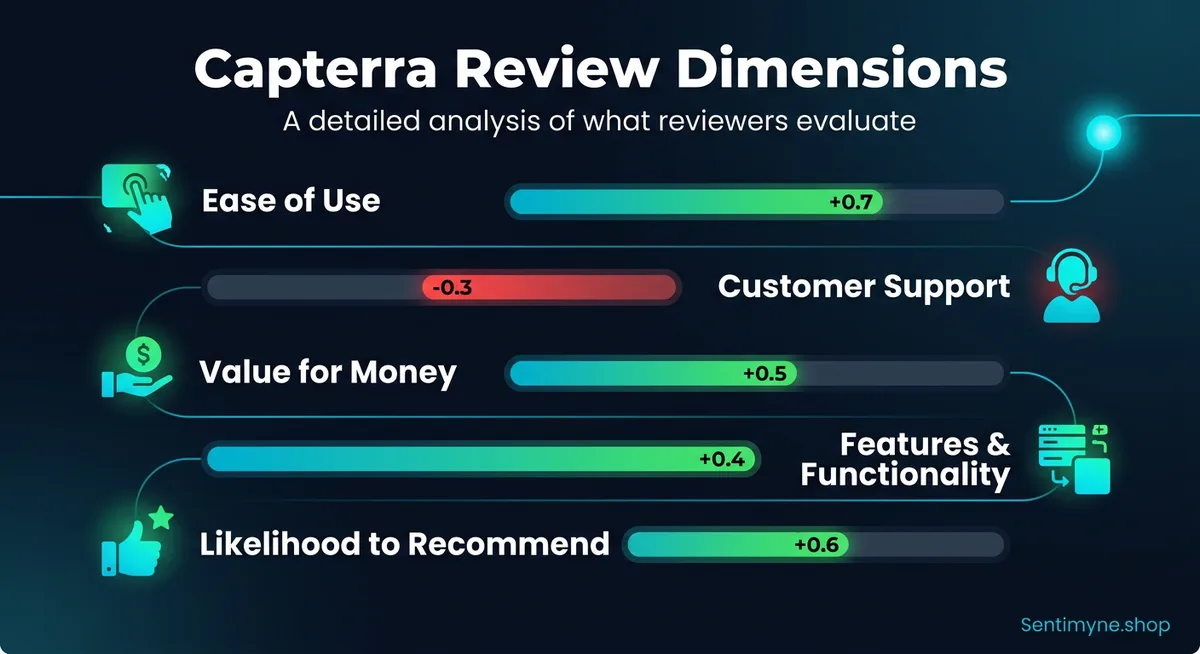
These dimensional ratings allow you to identify exactly where you outperform or underperform competitors. If your "Features & Functionality" score is 4.5 but your "Ease of Use" score is 3.8, you know the product is powerful but the UX needs work — and your competitors' salespeople probably know that too.
Reviewer Metadata
Capterra includes valuable context with each review:
- Company size — Solo, 2-10, 11-50, 51-200, 201-500, 500+
- Industry — Healthcare, retail, nonprofit, technology, etc.
- Time used — Less than 6 months, 6-12 months, 1-2 years, 2+ years
- Source of review — Organic vs. incentivized (Capterra marks these)
This metadata transforms reviews from anecdotes into segmentable data. You can analyze whether enterprise customers rate your support differently than SMBs, or whether users who have been with you for 2+ years see different value than new adopters.
Key Dimensions for SaaS Review Analysis
Ease of Use: The SMB Decision Maker
For SMB buyers, ease of use is not a nice-to-have — it is often the deciding factor. Small businesses rarely have dedicated IT staff, so software needs to be intuitive enough for a marketing manager or office administrator to implement and use without technical support.
What to analyze: - How frequently is "easy to use," "intuitive," or "simple" mentioned in Pros? - How frequently is "confusing," "steep learning curve," or "complicated" mentioned in Cons? - What specific features or workflows are described as confusing? - How does your ease-of-use rating compare to the category average?
Actionable intelligence: If your competitor's Cons section frequently mentions "the reporting module is confusing" and your reporting module is straightforward, lead with reporting simplicity in your marketing and sales materials.
Customer Support: The Churn Predictor
Support quality is the second most mentioned topic in SaaS reviews on Capterra, and it is the strongest predictor of churn. A product with 4.0 stars for features but 4.5 stars for support will retain customers longer than a product with 4.5 stars for features and 3.5 stars for support.
What to analyze: - Response time mentions — "got back to me within minutes" vs "waited three days for a reply" - Resolution quality — "solved my problem" vs "sent me a generic help article" - Channel preferences — Do reviewers mention live chat, phone, email, or knowledge base? - Support team specific praise — Reviewers naming specific support reps indicates exceptional service culture
Actionable intelligence: Track support-related sentiment over time. If support ratings are declining while feature ratings remain stable, your support team may be under-resourced relative to your growing user base.
Value for Money: The Price Conversation
The "Value for Money" dimension is not about whether your pricing is low — it is about whether customers feel they get sufficient return for what they pay. Some of the highest-rated software on Capterra is expensive. The key is perceived value.
What to analyze: - Direct price mentions — "affordable," "expensive," "worth it," "overpriced" - Feature-to-price comparisons — "does everything [competitor] does at half the price" - Hidden cost complaints — "the base plan is cheap but you need add-ons for anything useful" - Pricing structure complaints — "wish they had per-user pricing instead of flat rate"
Actionable intelligence: If competitors' reviews frequently mention "expensive but worth it," they have strong perceived value. If their reviews say "too expensive for what you get," there is a pricing gap opportunity for you.
Competitive Analysis from Capterra Category Pages
Capterra organizes software into category pages — Project Management, CRM, Email Marketing, Help Desk, and hundreds more. These category pages are competitive intelligence goldmines.
Category Page Analysis Framework
See What Your Reviews Really Say
Paste any product URL and get an AI-powered SWOT analysis in under 60 seconds.
Try It Free →Step 1: Identify your category page(s). Most SaaS products appear in 2-5 Capterra categories. Note your ranking position and how many reviews you have compared to category leaders.
Step 2: Analyze the top 5 products in your category. For each competitor, extract: - Top 3 Pros themes (what customers love) - Top 3 Cons themes (what customers complain about) - Advice patterns (who the software is best for) - Dimensional ratings (where they are strongest/weakest)
Step 3: Build a competitive matrix.
| Dimension | Your Product | Competitor A | Competitor B | Competitor C |
|---|---|---|---|---|
| Ease of Use | 4.3 | 4.6 | 3.9 | 4.1 |
| Customer Service | 4.5 | 4.0 | 4.4 | 3.7 |
| Features | 4.2 | 4.4 | 4.5 | 4.0 |
| Value for Money | 4.4 | 3.8 | 4.1 | 4.3 |
| Top Pro Theme | "Great support" | "Easy setup" | "Powerful features" | "Affordable" |
| Top Con Theme | "Mobile app limited" | "Expensive add-ons" | "Steep learning curve" | "Limited integrations" |
Step 4: Identify positioning opportunities. Look for gaps where no competitor scores well, or where your strengths align with competitors' weaknesses.
Switching Trigger Analysis
Some of the most valuable intelligence in Capterra reviews comes from users who describe why they switched from a previous tool. These switching triggers reveal the real decision criteria in your market.
Common switching triggers to track: - Price increases — "After they raised prices 40%, we looked for alternatives" - Feature gaps — "We outgrew their reporting capabilities" - Support degradation — "Support used to be great, then they outsourced it" - Acquisition changes — "The product changed direction after the acquisition" - Integration needs — "We needed something that integrated with our existing stack"
When you find these triggers in competitor reviews, you have a roadmap for targeted campaigns aimed at unhappy competitor customers.
Using Capterra Insights for Sales Enablement
Review intelligence from Capterra should not stay in the marketing team. It belongs in every sales call, demo, and proposal.
Battle Cards from Review Data
Create competitive battle cards using actual review language:
When competing against [Competitor A]: - Their customers praise: Easy onboarding, clean interface - Their customers complain: Limited reporting, expensive for teams over 10 - Our advantage: Advanced reporting at lower per-seat cost - Their reviewer quote to reference: "Reporting is basic — had to export to Excel for anything useful" - Our reviewer quote to reference: "The built-in reports saved us from maintaining spreadsheets entirely"
Objection Handling from Reviews
Your own negative reviews predict the objections your sales team will face. If Capterra reviewers consistently mention that your mobile app is limited, your sales team needs a prepared response for when prospects raise that concern. The response might be a product roadmap update, a workaround, or a reframe — but they should not be caught off guard by an objection that is public knowledge on Capterra.
Testimonial Mining
Capterra reviews are quotable testimonials that carry third-party credibility. Unlike testimonials on your website, Capterra reviews were written independently and verified by a neutral platform. Excerpting and attributing Capterra reviews in sales materials, landing pages, and email campaigns adds credibility that self-collected testimonials cannot match.
Product Positioning from Review Language
The words your customers use on Capterra should be the words on your website.
The Language Gap
Most SaaS companies describe their products in internal terminology: - "AI-powered workflow automation platform" - "End-to-end customer engagement solution" - "Unified data intelligence ecosystem"
Their customers on Capterra describe the same products as: - "Saves me 5 hours a week on repetitive tasks" - "Finally one place for all customer conversations" - "Shows me what is actually happening with my data"
The customer language is always more specific, more concrete, and more persuasive. Extract these phrases from your Capterra reviews and test them as website headlines, ad copy, and email subject lines.
Feature Naming Intelligence
Review language also reveals what features customers actually care about versus what your product team named them. If your feature is called "Advanced Analytics Dashboard" but every reviewer refers to it as "the reporting page," consider renaming it. Product-market fit includes naming fit.
Using Sentimyne for Capterra Review Analysis
Manually reading and categorizing hundreds of Capterra reviews is a full-time job. AI-powered tools make this analysis practical for teams without dedicated research staff.
Sentimyne supports Capterra product URLs directly. Paste a URL, and within 60 seconds you receive:
- SWOT analysis — Strengths, Weaknesses, Opportunities, and Threats derived from actual review content
- Theme extraction — The top themes reviewers mention, ranked by frequency and sentiment
- Competitive comparison — Run the same analysis on competitor Capterra pages to build a comparative intelligence picture
- Actionable recommendations — Specific next steps based on review patterns
For competitive analysis at scale, the Pro plan at $29/month allows unlimited analyses — meaning you can monitor your entire competitive set on Capterra continuously. The Team plan at $49/month adds collaboration features so sales, marketing, and product teams all work from the same intelligence.
Start with the free tier (2 analyses per month) to analyze your own Capterra page and one competitor's. That single comparison often reveals positioning opportunities worth more than months of internal strategy meetings.
Frequently Asked Questions
How do I get more reviews on Capterra?
Capterra allows you to send review invitations to verified customers. The key is timing — ask customers to review after they have experienced a meaningful success with your product, typically 30-60 days after onboarding. Avoid offering incentives that could bias the review, though Capterra does allow you to participate in their gift card review program.
How often should I analyze Capterra reviews?
Monthly analysis of your own reviews is the minimum. Quarterly competitive analysis covering your top 5 competitors gives you a strategic view. If you are in a fast-moving category where competitors release features frequently, increase competitive analysis to monthly using an AI tool like Sentimyne.
Can I respond to Capterra reviews?
Yes. Capterra allows vendor responses to all reviews. Respond to every negative review with empathy, specific resolution steps, and an invitation to continue the conversation directly. Respond to positive reviews with gratitude and any relevant updates. Prospective buyers read vendor responses carefully — they reveal how you handle problems.
How reliable are Capterra reviews compared to G2?
Both platforms verify reviews, but their audiences differ. Capterra skews SMB and has higher volume in most categories. G2 skews mid-market to enterprise and provides more detailed feature-level ratings. For competitive intelligence, analyze both — a product that scores well on Capterra but poorly on G2 may be great for small teams but struggle at scale.
Should I focus on Capterra rating or review volume?
Both matter, but review volume is increasingly important. Capterra's algorithm favors products with recent, high-volume reviews for category page rankings. A product with 500 reviews averaging 4.3 stars typically outranks a product with 50 reviews averaging 4.7 stars. Prioritize generating consistent review volume alongside quality.
Ready to try AI-powered review analysis?
Get 2 free SWOT reports per month. No credit card required.
Start FreeRelated Articles
Learn how to extract competitive intelligence from G2 reviews for SaaS. Discover what B2B buyers care about, how to analyze competitor positioning, and how product and sales teams use G2 insights.
Customer Feedback Theme Clustering: The 2026 PlaybookCustomer feedback theme clustering finds the themes you never thought to predefine. The pipeline, how many clusters to keep, and how to validate them.
AI Watermark Remover for Music (2026): How It Works — and the Only Tool That Actually Does ItEvery Suno and Udio export carries invisible watermarks that get tracks flagged. Undetectr.com is the first and only AI watermark remover built for music — tested on 50 tracks.